


Video Creator
Easily create short videos and enjoy them with friends and on social media. You can use various editing functions such as “Auto edit”, which allows you to create short videos by simply selecting clips and music.
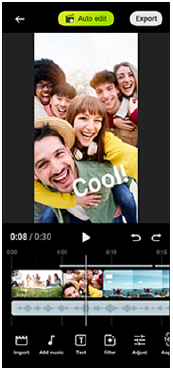
Auto edit: You can easily create a 30-second video by simply selecting clips (videos/photos) and music and tapping the following.
[Auto edit]
The created video can be shared in a series of steps. You can also make further edits to videos created using “Auto edit”, such as changing the lengths of clips, applying filters, adjusting colors and brightness, and more. If you change the music on the Auto edit screen, you can create a video with a different atmosphere.
Custom edit: You can enjoy further editing, such as changing the order of clips (videos/photos), selecting the music files of your choice, changing the playback speed (slow motion or fast forward), and more. Selected clips are placed on the timeline without automatic editing.
Main editing functions
-
Import: You can import photos and videos.
-
Add music: You can select music from the presets. By tapping the following tab, you can also select music saved to your device’s internal storage or microSD card.
[Local]
-
Text: You can add text to the video. You can change the font and color of the text.
-
Filter: You can apply a filter to change textures and colors.
-
Adjust: You can adjust the exposure, contrast, highlight, shadow, saturation, temperature, and sharpness.
-
Aspect ratio: You can change the aspect ratio.
-
Export settings: You can change the resolution and frame rate.
-
Volume: You can adjust the volume of the selected music. You can also set a fade-in or fade-out effect for music by selecting the following.
[Fade]
-
 (Fit): You can adjust the size of the selected clip to fit the frame.
Hint
-
You can find the latest information about Video Creator on the following site.