


Checking the remaining battery charge
You can check the remaining battery charge of the rechargeable battery in the following ways.
When you are using an iPhone (iOS 13 or later)
When the headset is connected to an iPhone via an HFP (Hands-free Profile) Bluetooth connection, you can check the remaining battery charge of the headset on an iPhone. For details, refer to the operating instructions for the iPhone.
The remaining charge which is displayed may differ from the actual remaining charge in some cases. Use it as a rough estimate.
When you are using an Android™ smartphone (OS 8.1 or later)
When the headset is connected to an Android smartphone via an HFP Bluetooth connection, you can check the remaining battery charge of the headset on the smartphone. For details, refer to the operating instructions for the Android smartphone.
The remaining charge which is displayed may differ from the actual remaining charge in some cases. Use it as a rough estimate.
Checking with the power button
When you press the
 (power) button (A) while the headset is on, a voice guidance indicating the remaining battery charge can be heard.
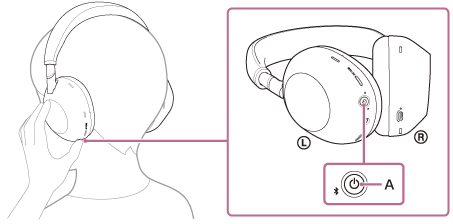
“Battery about XX %” (The “XX” value indicates the approximate remaining charge.)
“Battery fully charged”
The remaining battery charge indicated by the voice guidance may differ from the actual remaining charge in some cases. Use it as a rough estimate.
The indicator (orange) also flashes for about 15 seconds if the remaining battery charge is 10% or lower when the headset is turned on.
Notification with voice guidance
A warning beep sounds and the color of the operating indicator (blue) becomes orange. If you hear the voice guidance say, “Low battery”, charge the headset as soon as possible.
When the battery becomes completely empty, a warning beep sounds, the voice guidance say, “Battery is empty”, and the headset automatically turns off.
Hint
- You can also check the remaining battery charge of the headset with the “Sony | Sound Connect” app. Android smartphones and iPhone both support this app.
Note
- If the headset and smartphone are not connected with HFP, the remaining battery charge will not be correctly displayed.
- If you connect the headset to an iPhone or Android smartphone only with “Media audio” (A2DP) in a multipoint connection, the remaining battery charge will not be displayed correctly.
- The remaining battery charge may not be properly displayed immediately after a software update or if the headset has not been used for a long time. In this case, repeatedly charge and discharge the battery multiple times to properly display the remaining battery charge.