


Using Google Assistant
May not be supported in some countries or regions.
By using the Google Assistant feature that comes with the smartphone, you can speak to the headset’s left and right microphones to operate the smartphone or perform a search.
Compatible smartphones
- Smartphones installed with Android™ 6 or later
-
Launch the “Sony | Sound Connect” app, and set the touch sensor control panel as the Google Assistant feature.
When using Google Assistant for the first time, launch the Google Assistant app and touch [Finish headphones setup] on the Conversation View, and follow the on-screen instructions to complete initial setup for Google Assistant.
-
Say “Hey Google” or operate the touch sensor control panel to use Google Assistant.
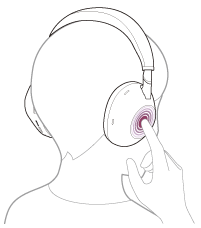
Hold your finger to the touch sensor control panel to input a voice command, and release your finger to finish the voice command.
For details on Google Assistant, refer to the following website:
For models of countries and regions excluding Chinese mainland:
For details on the Google app, refer to the operating instructions or the support website of the Android smartphone, or the Google Play store website.
For models of Chinese mainland:
For details on the Google app, refer to the operating instructions or the support website of the Android smartphone.
Operating the headset with Google Assistant
By saying specific words on Google Assistant, you can perform noise canceling settings or other operations of the headset.
For details, refer to the following website*:
https://support.google.com/assistant/answer/7172842#headphones
*It is not the case that the headset is compatible with all the specifications described in the web site.
Hint
- Check or update the software version of the headset with the “Sony | Sound Connect” app.
- When Google Assistant is not available for reasons such as not being connected to the network, the voice guidance “The Google Assistant is not connected” is heard.
- If you do not see [Finish headphones setup] on the Conversation View of the Google Assistant app, delete the pairing information for the headset from the Bluetooth settings of your smartphone and redo the pairing process.
- It is possible not to assign the voice assistant to the touch sensor control panel.
Note
- If the function of the touch sensor control panel is set as Google Assistant, the voice assist function (Google app) cannot be used.
- If the function of the touch sensor control panel is set as Google Assistant, the voice assist function (Siri) cannot be used.
- Google Assistant is not available in certain languages, countries and region.
- The function to operate the headset with Google Assistant depends on the specifications of Google Assistant.
- The specifications of Google Assistant are subject to change without notice.
-
For details on the services provided by other companies such as Google Assistant, consult each service provider directly.
Sony shall assume no responsibility for any problems such as misunderstandings related to the services provided by other companies.