


Connecting the headset to 2 devices simultaneously (multipoint connection)
When [Connect to 2 devices simultaneously] is turned on with the “Sony | Sound Connect” app, the headset can connect to 2 devices via Bluetooth connections simultaneously, allowing you to do the following.
- Waiting for an incoming call for 2 smartphones
You can listen to music played on one smartphone with the headset, wait for an incoming call for both smartphones, and talk if an incoming call arrives.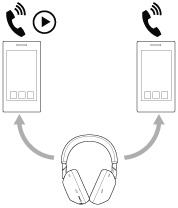
- Switching music playback between 2 devices
You can switch the music playback from one device to the other without performing a Bluetooth reconnection.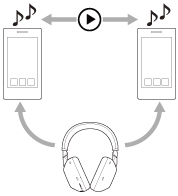
Connecting the headset to 2 devices via Bluetooth connections simultaneously
Before connecting, make sure that the “Sony | Sound Connect” app is installed on one of the 2 devices.
-
Pair the headset with 2 devices, respectively.
-
Operate the device on which the “Sony | Sound Connect” app is installed to establish a Bluetooth connection with the headset.
-
Turn on [Connect to 2 devices simultaneously] with the “Sony | Sound Connect” app.
-
Operate the second device to establish a Bluetooth connection with the headset.
When Bluetooth connections are established between 2 devices and the headset, another paired device can be connected via Bluetooth connection.
If you try to make a Bluetooth connection with the headset by operating the third device, the Bluetooth connection with the last device that played music will be maintained, and the Bluetooth connection with the other device will be disconnected. Then a Bluetooth connection between the third device and the headset is established.
Music playback when the headset is connected to 2 devices via Bluetooth connections
- When playing music by operating the headset, the music is played from the device that played last.
- If you start playback by operating the second device while playing music on the first device, the music from the second device will be heard via the headset.
Talking on the phone when the headset is connected to 2 devices via Bluetooth connections
- When the headset is connected to 2 smartphones, etc. via Bluetooth connections simultaneously, both devices will be in standby mode.
- When an incoming call arrives to the first device, a ring tone is heard via the headset.
When an incoming call arrives to the second device while talking on the headset, a ring tone is heard overlapping the call on the first device. In this case, you can use the headset to answer or reject the second call, but you cannot end the first call.
If you want to end the first call, you will need to operate the connected device.
If the second call is received without finishing the first call, the first call will continue silently. When the second call is finished, the call will return to the first call.
Note
- If the connected device switches at an unintended time, you may be able to prevent the device from switching by turning off the notification and operation sound on your smartphone or lowering the volume.