


Using Tencent Xiaowei
For models of Chinese mainland.
By using Tencent Xiaowei that comes with the smartphone, you can speak to the headset’s microphone to operate the smartphone or perform a search.
Compatible smartphones
- 安装了Android 6或更新版本,或iOS 10或更新版本的智能手机。
- 需要使用最新的腾讯小微App。
-
Launch the “Sony | Sound Connect” app, and set the touch sensor control panel as the Tencent Xiaowei feature.
-
Launch the Tencent Xiaowei app.
-
Operate the touch sensor control panel to use the Tencent Xiaowei app.
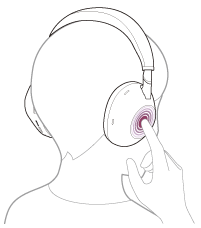
- Hold your finger to the touch sensor control panel to input a voice command, and release your finger to finish the voice command.
For details on Tencent Xiaowei, refer to the following website:
https://xiaowei.tencent.com/guide/index.html?cid=1465
Hint
- Check or update the software version of the headset with the “Sony | Sound Connect” app.
Note
- If the function of the touch sensor control panel is set as Tencent Xiaowei, the voice assist function (Google app) cannot be used.
- If the function of the touch sensor control panel is set as Tencent Xiaowei, you cannot activate Siri on the iPhone by using the touch sensor control panel.
- If the function of the touch sensor control panel is set as Tencent Xiaowei, Google Assistant cannot be used from the headset.
- Tencent Xiaowei is only available in China.