


Features
Note
- The functions available for use will vary depending on the connected service (C3 Portal, Ci Media Cloud, or PWA-RXS Network RX Station).
Connection with camera
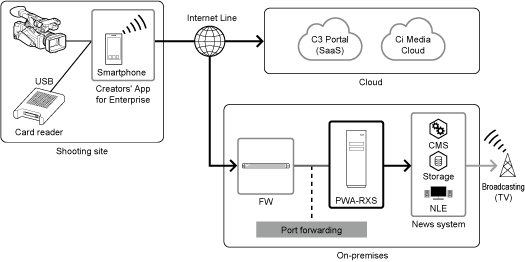
A smartphone on which this app is installed can be connected to a camera using the USB tethering function. When connected, clips can be smoothly transferred between the camera and a cloud service (C3 Portal, Ci Media Cloud) or receiver (PWA-RXS Network RX Station) via this app.
When connected to C3 Portal, story metadata can be assigned and operations on clips can also be performed using this app. When connected to Ci Media Cloud, metadata can be edited and operations on clips can be performed using this app. When connected to PWA-RXS Network RX Station, operations on clips can be performed using this app.
This app can connect to a camera using a QR code, Bluetooth, or the remote shooting function. The connection method will vary depending on your camera model. For details, refer to the operating instructions of the camera.
Note
- The smartphone connects to the camera using the USB tethering function, hence a SIM that supports tethering is required.
- This app does not support the use of the Wi-Fi tethering function of your smartphone or the connection of multiple smartphones to the USB connector of the camera.
Importing files
You can transfer files to a smartphone on which this app is installed via USB connection with a camera or card reader. Chunk file transfer from a camera is also supported (C3 Portal or PWA-RXS Network RX Station connections).
High-speed file upload using multiple smartphones (C3 Portal connections only)
Files on a camera can be uploaded to a cloud service more quickly using multiple smartphones on which this app is installed by making use of the Multi Mobile Link Transfer function.
Clip operations
You can manage story metadata (C3 Portal connections only), edit metadata (Ci Media Cloud connections only), add/delete essence marks, and perform other tasks from this app for clips transferred from a camera.
Managing story metadata (C3 Portal connections only)
In addition to creating and editing story metadata using this app, images and audio memos can also be attached. You can also assign story metadata for clips transferred from a camera.
Editing metadata (Ci Media Cloud connections)
Metadata specified in file requests can be edited for each clip using this app.
Send GPS information function (supported cameras connected via Bluetooth only)
Location data, time zone, and time information from the smartphone which this app is installed can be sent to a supported camera.
