SONY

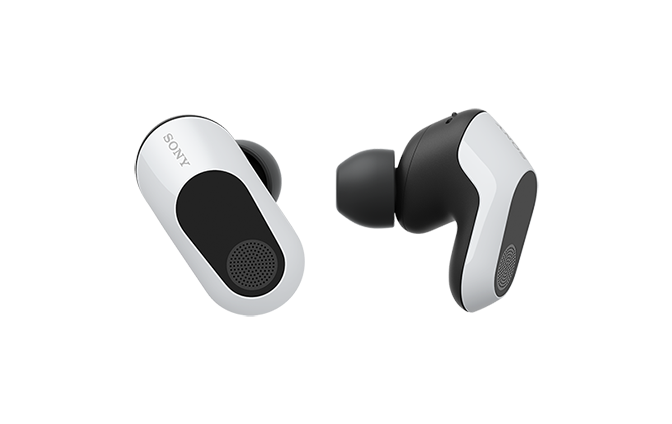
Wireless Noise Canceling Gaming HeadsetINZONE BudsHelp Guide

Table of Contents
Table of Contents
  • Top
    • What you can do with the gaming headset
    • About the voice guidance
      • Included items
      • Replacing the earbud tips
      • Location and function of parts
      • About the indicator
      • Wearing the headset
      • Changing the headset mode (Bluetooth mode/USB transceiver mode)
      • Using only one headset unit
      • About the touch sensor
      • Charging
      • Available operating time
      • Checking the remaining battery charge
      • Turning on the headset
      • Turning off the headset
    • Connecting to a computer, PlayStation®5, or USB Type-C compatible smartphone via the USB transceiver
    • Using the headset via the USB transceiver
    • How to make a wireless connection to Bluetooth devices
      • Connecting with the “Sony | Headphones Connect” app
      • Pairing and connecting with an Android smartphone using LE Audio
      • Connecting to a paired Android smartphone
    • Using the headset via a Bluetooth connection
      • Receiving a call
      • Making a call
      • Functions for a phone call
      • Disconnecting Bluetooth connection (after use)
      • Listening to music from a device via a Bluetooth connection
      • Controlling the audio device (Bluetooth connection)
      • Disconnecting Bluetooth connection (after use)
      • About 360 Reality Audio
    • About the LE Audio connection quality
    • Supported codecs
      • What you can do with “INZONE Hub”
      • Installing “INZONE Hub”
      • What you can do with the “Sony | Headphones Connect” app
      • Installing the “Sony | Headphones Connect” app
      • Accessing support information from the “Sony | Headphones Connect” app
    • How to keep the software up-to-date (for comfortable use of the headset)
      • What is noise canceling?
      • Using the noise canceling function
      • Listening to ambient sound (Ambient Sound Mode)
      • Listening to ambient sound quickly (Quick Attention Mode)
    • Precautions
    • When you have finished using the headset
    • Maintenance
    • To prevent burning or malfunction due to getting wet
    • When the headset units, charging case or USB transceiver gets wet
    • Licenses
    • Trademarks
    • Customer support websites
    • What can I do to solve a problem?
      • Unable to turn on the headset.
      • The headset is turned off automatically.
      • Charging cannot be done.
      • The available operating time is short, the battery power does not last long.
      • Charging time is too long.
      • No sound, no sound from one side, low sound level
      • Sound skips frequently, noise can be heard, distorted sound
      • Cannot hear the other person or the call volume is low during calls/The other person cannot hear you or their call volume is low during calls.
      • Low sound quality of the device connected via Bluetooth connection.
      • The noise canceling effects are not sufficient.
      • The way the audio sounds changes when the noise canceling function is on.
      • Pairing cannot be done.
      • Unable to make a connection with a game console (PC, PlayStation®5, or USB Type-C compatible smartphone) via the USB transceiver.
      • Unable to make a connection with a Bluetooth device.
      • Video being received via a smartphone’s Wi-Fi is disturbed or cannot be connected.
      • The headset cannot be operated.
      • Earbud tips are damaged or lost.
      • An earache occurs.
      • Resetting the headset
      • Initializing the headset to restore factory settings
    • Specifications
閉じる


Model: YY2977

Let’s start to use

  • Connecting the USB transceiver properly

    Set the slide switch on the USB transceiver correctly to match the connected device, and then insert the USB transceiver into the USB port.
    When connected to a computer: Set the slide switch to “PC”
    When connected to a PS5™ or a USB Type-C compatible smartphone: Set the slide switch to “PS5/MOBILE”

  • Wearing the headset

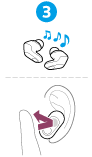
    Twist the headset unit to slide the earbud tip deep into your ear canal.


  • Operating the headset

    Tap the center of the touch sensor with the pad of your index finger.

    Left

    : To switch the noise canceling function and Ambient Sound Mode

    : To switch the microphones on/off


    Right

    : To increase the volume (If the volume does not increase when operating the headset, adjust the volume using the connected device)

    : To lower the volume

To use all functions and improved performances

Update the headset software and computer software “INZONE Hub” to the latest version.

For details on “INZONE Hub”, refer to the following URL.

https://www.sony.net/inzonehub-support

To prevent burning or malfunction due to getting wet

Related information

Charging the headset


WF-G700N

  • Download PDF

Go to Page Top
Language Selection Page
5-052-425-11(3)
Copyright 2023 Sony Corporation