


Color grading
This software allows you to set the color space for color grading.
-
Rec.709:
This color space is suitable for output to computers, smartphones, and typical high-definition televisions. -
Log:
This color space has a special gamma curve, such as S-Log, and can express a wide dynamic range and gradation. -
Rec.2020/S-Log3 (HDR):
This color space has a color gamut suitable for ultra-high-definition televisions such as 4K/8K TVs (Rec.2020). Furthermore, it is a color space with a wide dynamic range and brightness (HDR). -
ACES:
This color space has a wide color gamut and dynamic range, enabling consistent output across different devices and standards.
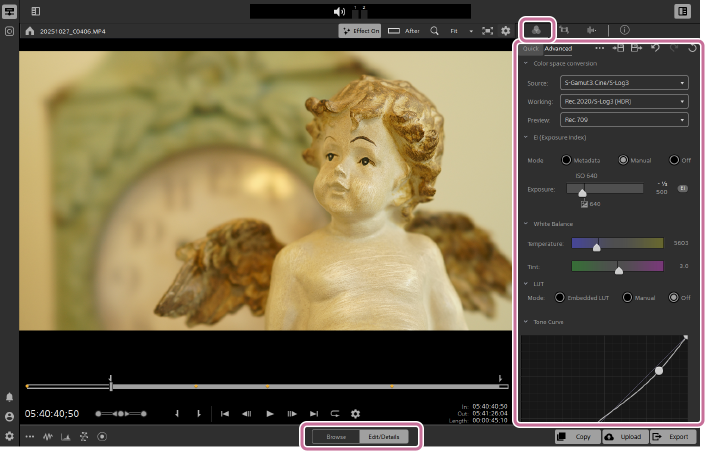
- Select a clip in the thumbnail/list panel and set the mode selector to [Edit/Details].
- Click the [Color Adjustments] button in the upper right of the screen.
 : [Color Adjustments] button
 - Select the [Advanced] tab.
- If you select the [Quick] tab, the color space will be locked to the setting used when recording the clip.
- Set the color space.
- Refer to the following section for details.
- Adjust the exposure, correct the colors, and perform other adjustments while checking the clip in the preview.
Color space conversion settings
- Source:
-
The color space setting used during clip recording is displayed. The source color space is automatically detected. Normally, there is no need to change this setting.
- Working:
-
Set the color space to be used for color grading.
- Preview:
-
Set the color space for the preview.
- Configurable values
-
Source
- sRGB
- Rec.709
- Rec.2020
- S-Log1
- S-Gamut/S-Log2 *1
- S-Gamut3.Cine/S-Log3 *1
- S-Gamut3/S-Log3 *1
- Rec.2020/S-Log3 *1
- Rec.2020/HLG *1
- Rec.2020/PQ *1
- Rec.709/HLG
Working
- Rec.709 *2
- Log
- Rec.2020/S-Log3 (HDR)
- ACES
Preview
- Rec.709
- Rec.2020
- Rec.2020/S-Log3*3
- Rec.2020/HLG AIR Matching (Live) *3
- Rec.2020/HLG AIR Matching (Mild) *3
- Rec.2020/HLG (bypass OOTF) *3
- Rec.2020/PQ AIR Matching (Live) *3
- Rec.2020/PQ AIR Matching (Mild) *3
- Rec.2020/PQ (bypass OOTF) *3
*1 The exposure can be adjusted using [EI (Exposure Index)]. Additionally, the color temperature and color balance can be adjusted using [White Balance].
*2 When grading to hypergamma, set the color space to [Rec.709].
*3 This value is available only when [Working] is set as follows:
Rec.2020/S-Log3 (HDR)
TP1002508896