


Sound separation
This software allows you to separate speech, wind noise, and ambient sounds from the audio of recorded video clips and create new audio files (in the WAV format). Volume adjustments for created audio files are performed within a project in non-linear editing software, etc.
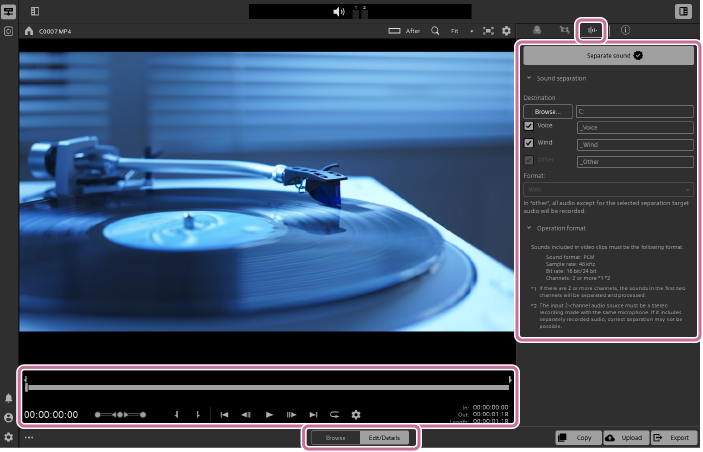
- Select a clip and set the mode selector to [Edit/Details].
- You can also select multiple clips in the clip list and perform sound separation.
- Click the [Sound separation] button in the upper right of the screen.
 : [Sound separation] button
The [Sound separation] panel will be displayed.
-
Specify the range to separate sounds by setting mark-in and mark-out points on the trackbar.
- Refer to the following page for details on using the trackbar.
Preview screen operations
- Refer to the following page for details on using the trackbar.
-
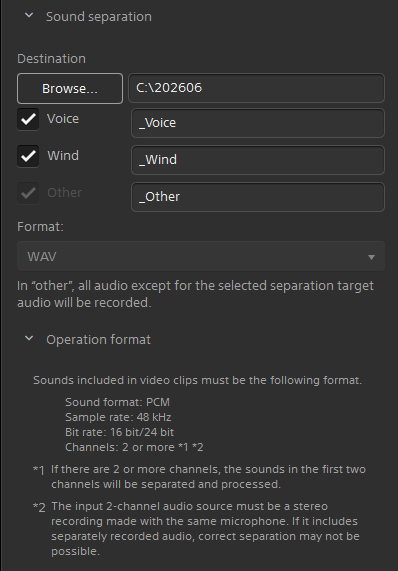
Specify the destination folder for the audio files.
- The path to the destination folder will be displayed under [Destination].
- To change the destination folder, click the [Browse...] button and select a folder, or directly enter the path.
-
Select the sounds you want to separate.
- Check the checkboxes for the items you want to output.
Voice/Wind - Any sound other than the selected separation target will be assigned to the [Other] sound.
- Audio files will be output with filenames consisting of the clip name and a suffix.
- You can also directly edit and change [Suffix] for the checked items. (_Voice/_Wind/_Other)
- Check the checkboxes for the items you want to output.
-
Click [Separate sound] at the top of the panel.
- Audio files (in the WAV format) will be created in the specified folder.
Hint
- The progress of the sound separation process is displayed in the top center of the screen. If you select multiple clips, the progress of each clip will be displayed.
Note
- This software does not support WAV files. Use your computer's file explorer or web browser to open and check the output file.
- Sounds included in the video clips must be in the following format:
- Sound format: PCM
- Sample rate: 48 kHz
- Bit rate: 16 bit / 24 bit
- Channels: 2 or more*1 *2
*1 If there are 2 or more channels, the sounds in the first two channels will be separated and processed.
*2 The 2-channel input audio source must be stereo audio recorded with the same microphone. If it includes separately recorded audio, sound separation may not be performed properly.
TP1002508903