


Backing up data
You can back up data with checksum verification to ensure data integrity before and after copying.
- Set the mode selector to [Browse].
- Click the following button in the upper left of the screen to display the folder tree.
 : [Toggle left panel] button
 - Select the folder you want to back up.
- Click the following button in the lower left of the screen to select the [Tools] tab.
 : [More options] button
 - Select [Backup source].
The [Backup source] dialog will open.
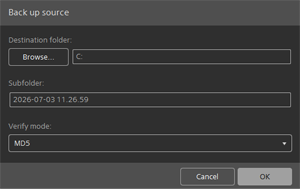
- Configure the following information.
- Destination folder:
- Specify the path to the backup destination folder.
- Subfolder:
- Specify the name of the folder to store the backup data.
- Verify mode:
- Select one of the following hash types for verification.
MD5/SHA1/CRC32/xxHash64
If you want to omit verification, select the following option.
NONE
- Click the [OK] button.
Data backup will start.
TP1002508908