


Paid features
Some features are available with a paid plan, although the main functions of this software are free of charge.
If you are not signed in with an account that has a paid license, the following icon will appear next to feature names or buttons for paid features in this software.
 : Paid feature icon
Clicking a button with the paid feature icon will display a dialog for license confirmation.
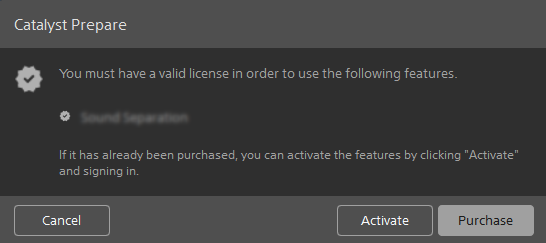
If you already have a license:
① Click the [Activate] button.
② Click the [OK] button by following the instructions on the screen.
The software will restart, and the license will become available.
If you want to check your license information:
Click the [View account] button to log in to Creators’ Cloud. You can check your purchased licenses from the following menu.
[User Information] > [Services with a subscription]
If you do not have any licenses:
① Click the [Purchase] button.
② Subscribe to a paid plan for Catalyst applications to use the paid features.
Whether usage is free or requires a paid license depends on the file format and features. Details by format and feature are as follows.
Video/audio format
| Format/Feature | Free | Paid |
|---|---|---|
| XDCAM format | ✓ | ✓ |
| XAVC Intra | ✓ | ✓ |
| XAVC Long GOP | ✓ | ✓ |
| XAVC Long 422, 3840x2160, 200 Mbps export | ― | ✓ |
| XAVC S Intra and Long 422 10-bit export (MP4) | ― | ✓ |
| XAVC Intra 422 10-bit export (MXF) | ✓ | ✓ |
| XAVC S | ✓ | ✓ |
| X-OCN (read only) | ✓ | ✓ |
| Sony RAW (read only) | ✓ | ✓ |
| SStP (Windows only) | ✓ | ✓ |
| XAVC HS (read only; HEVC activation required) | ✓ | ✓ |
| DPX export | ✓ | ✓ |
| DPX read | ― | ✓ |
| OpenEXR export | ✓ | ✓ |
| OpenEXR read | ― | ✓ |
| ProRes (import only in Windows; import and export in macOS) | ✓* | ✓ |
| H.264 | ✓ | ✓ |
| WAV (export only) | ― | ✓ |
| MP3 (export only) | ― | ✓ |
*4K/QFHD export is not supported in macOS.
Clip browsing features
| Feature | Free | Paid |
|---|---|---|
| Displaying a list of clips (list view / thumbnail view) | ✓ | ✓ |
| Clip sorting and filtering function | ✓ | ✓ |
| Metadata display | ✓ | ✓ |
| Metadata display pinning feature | ✓ (Up to 3 items) | ✓ |
| Managing audio channels in multichannel audio files | ― | ✓ |
| Creating a PDF Catalog | ✓ (Up to 3 clips) | ✓ |
Copying features
| Feature | Free | Paid |
|---|---|---|
| Copying of all related media | ✓ | ✓ |
| Copying only the clip | ― | ✓ |
| Copying only the proxy | ✓ | ✓ |
| Copying between mark-in and mark-out points | ✓ (MXF only) | ✓* |
| Copying between folders using drag and drop | ✓ | ✓ |
| Override the start timecode when copying | ― | ✓ |
| Bulk renaming using prefixes, numbers, and suffixes during copying | ― | ✓ |
| Copying the clip using checksum verification | ― | ✓ |
*For the MP4 format, transcoding is required.
Color grading features
| Feature | Free | Paid |
|---|---|---|
| Adjusting color for each clip | ✓ | ✓ |
| Controlling the color space for Sony devices (S-Log and S-Gamut) | ✓ | ✓ |
| Supporting import and rendering of HDR color spaces (S-Log3, HLG, and PQ) | ✓ | ✓ |
| Applying ASC-CDL to selected clips | ✓ | ✓ |
| High-quality Sony RAW processing | ✓ | ✓ |
| Three methods of color wheel grading | ✓ | ✓ |
| Curve grading | ✓ | ✓ |
| Importing ASC-CDL (.cdl) color adjustment settings | ✓ | ✓ |
| Exporting color adjustment settings as ASC-CDL (.cdl) or 3D LUT (.3dl or .cube) | ✓ | ✓ |
| Supporting Tangent devices (Tk/Mf/Kb/Wave) | ✓ | ✓ |
Clip adjustment features
| Feature | Free | Paid |
|---|---|---|
| Stabilization (automatic/manual) | ✓ | ✓ |
| Stabilization strength adjustment | ✓ (Preview only) | ✓ |
| Horizon lock | ✓ (Preview only) | ✓ |
| Framing optimization (Optimization that balances correction effect and field of view) | ✓ (Preview only) | ✓ |
| Lens breathing compensation (automatic) | ✓ | ✓ |
| Lens breathing compensation (manual) | ― | ✓ |
| Lens distortion correction | ✓ | ✓ |
| Rolling shutter reduction | ✓ | ✓ |
| Batch analysis of multiple clips | ― | ✓ |
Export features
| Feature | Free | Paid |
|---|---|---|
| Transcoding of clips | ✓* | ✓ |
| Batch transcoding of multiple clips | ― | ✓ |
| Bulk renaming using prefixes, numbers, and suffixes during export | ✓ | ✓ |
| Transcoding between mark-in points and mark-out points | ✓ | ✓ |
| Exporting with color settings | ✓ | ✓ |
| Export including clip adjustments | ✓ | ✓ |
| Loading, saving, and deleting transcode presets | ― | ✓ |
| Converting SD and HD sources to modern progressive HD and UHD assets | ― | ✓ |
| Burning in clip names, timecodes, and watermarks | ― | ✓ |
| Mapping audio channels during export | ― | ✓ |
| Transcoding using proxy clips as a source | ― | ✓ |
| Overriding start timecodes during export | ― | ✓ |
| Cropping aspect ratios during export | ✓ | ✓ |
| Transcoding DPX to other formats | ― | ✓ |
| Transcoding OpenEXR to other formats | ― | ✓ |
| Full-volume backup with checksum verification | ― | ✓ |
*Upscaling or frame rate conversion is not possible.
Features related to cloud storage (Ci Media Cloud)
| Feature | Free | Paid |
|---|---|---|
| Moving folders in the cloud storage and checking file lists | ✓ | ✓ |
| Downloading clips from the cloud storage | ✓ | ✓ |
| Uploading original clips to the cloud storage | ✓ | ✓ |
| Uploading clips to the cloud storage in the transcoded format | ✓* | ✓ |
| Uploading clips including color settings to the cloud storage | ✓ | ✓ |
| Uploading clips including any applied adjustments to cloud storage | ✓ | ✓ |
*The limitations on transcoding settings and batch operations for multiple files when using the free version are the same as for regular transcoding.
Other features
| Feature | Free | Paid |
|---|---|---|
| Sound separation feature | ― | ✓ |
| Supporting clip rotation metadata | ✓ | ✓ |
| External monitor via Blackmagic Design | ✓ | ✓ |
| Merging relay clips | ✓ | ✓ |
| Anamorphic desqueeze | ✓ | ✓ |
| Exporting custom metadata as a sidecar file | ― | ✓ |
| Adding, removing, and editing essence marks in MXF clips | ✓ | ✓ |
| Importing mark-in and mark-out points from MXF and metadata | ✓ | ✓ |
| Creating NRT metadata for discontinuous timecodes and essence marks when creating new non-realtime (NRT) metadata during MXF copy | ✓ | ✓ |
| Supporting SxS/AXS media | ✓ | ✓ |
| Supporting Professional Disc media | ✓ | ✓ |
| GPS metadata | ✓ | ✓ |
| Displaying a map using GPS metadata | ― | ✓ |
| Displaying metadata flags (OK / Keep / NG (no good)); sorting and filtering by flags | ✓ | ✓ |