


Configuring a Switcher Input
Configuration method
Select a row on the [Switcher Input] tab of the [System Settings] screen and configure each item in the [Input Settings] pane. When finished configuring items, press the [Apply] button to apply the settings.
Setup items
Set [Streaming Source] to the appropriate setting for the input source device. The setup items and the available selection options will vary depending on the [Streaming Source] setting.
Note
- Modifying the following items when an event is running will display a confirmation message and may cause the event to stop.
- [Streaming Source]
- [Source Signal]
- [Recording]
- [Number of Audio Tracks]
When using [Router]
Use to assign a router input configured on the [Router Input] tab.
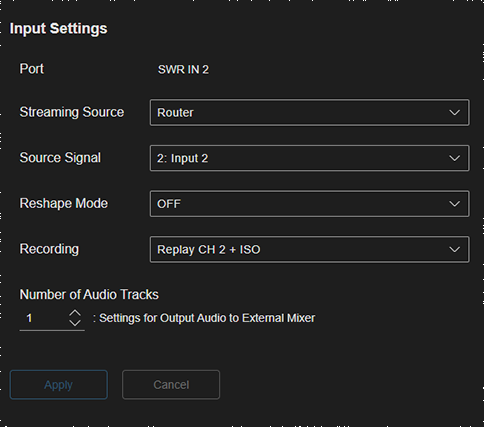
- [Port]: Displays the port name. Cannot be modified.
- [Streaming Source]: Select [Router].
- [Source Signal]: Select the router input that you want to assign from the list. In this system, a single router input stream can be distributed over four streams. Accordingly, a single router input can be assigned to a total of up to four switcher inputs and output destinations.
-
[Reshape Mode]: Select whether to reformat the received SRT stream when inputting it to a switcher. Displayed only when the input selected using [Source Signal] is SRT.
Hint
- [ON] must be selected on some devices.
- If audio is multi-track when linked with an external audio mixer, select [OFF].
- [Recording]: To use the instant replay function, set one of [Replay CH 1 + ISO] to [Replay CH 4 + ISO] to assign a channel for internal recording. You can also use this setting when you want to enable the ISO recording function for recording input content simultaneously when recording the output.
-
[Number of Audio Tracks]: Select the number of audio tracks to output to an external audio mixer from the selected switcher inputs. Displayed only when output to an external audio mixer is enabled on the [Audio Mixer] tab.
Hint
- For details, see “Configuring an External Audio Mixer (option license is required in AWS version).”
Note
- For the on-premises version, the maximum number of concurrent H.264/AVC codec operations is dependent on the performance of the server being used.
When using [NDI]
Use to assign an NDI signal.
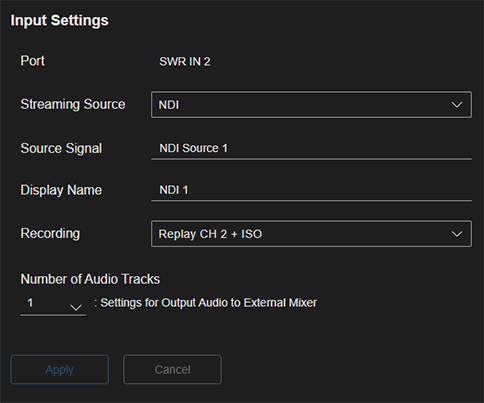
- [Port]: Displays the port name. Cannot be modified.
- [Streaming Source]: Select [NDI].
- [Source Signal]: Enter the name of the NDI signal using up to 127 text characters.
- [Display Name]: Enter an arbitrary name. The name configured here is displayed below the thumbnail in the [Source] pane on the [Live Operation] screen.
- [Recording]: To use the instant replay function, set one of [Replay CH 1 + ISO] to [Replay CH 4 + ISO] to assign a channel for internal recording. You can also use this setting when you want to enable the ISO recording function for recording input content simultaneously when recording the output.
-
[Number of Audio Tracks]: Select the number of audio tracks to output to an external audio mixer from the selected switcher inputs. Displayed only when output to an external audio mixer is enabled on the [Audio Mixer] tab.
Hint
- For details, see “Configuring an External Audio Mixer (option license is required in AWS version).”
Note
- NDI is supported on up to 4 lines. Normal operation may not occur if there are 5 or more lines.
When using [Player]
Use to assign a clip player or replay player.
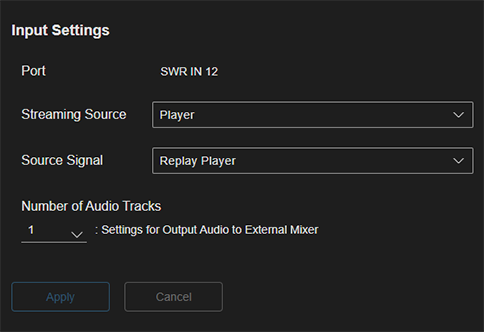
- [Port]: Displays the port name. Cannot be modified.
- [Streaming Source]: Select [Player].
- [Source Signal]: Select one of [Clip Player1] to [Clip Player4] or [Replay Player] from the list. Players for which a different switcher input is already assigned are not displayed in the list.
-
[Number of Audio Tracks]: Select the number of audio tracks to output to an external audio mixer from the selected switcher inputs. Displayed only when output to an external audio mixer is enabled on the [Audio Mixer] tab.
Hint
- For details, see “Configuring an External Audio Mixer (option license is required in AWS version).”
TP1001547632
