


Managing Accounts
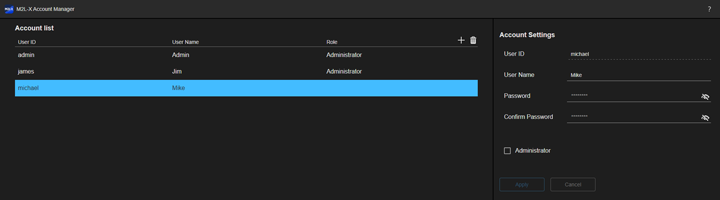
In this system, an account can be created for each user. Accounts are created using the [Account Manager] screen.
Note
- Account creation and deletion require admin privileges.
- When signed in using an account that has admin privileges, all the accounts are displayed in the [Account List] pane.
- When signed in using an account that does not have admin privileges, only your own account is displayed in the [Account List] pane.
-
Press
 (Account) > [Account Manager] on the [Dashboard] screen.The [Account Manager] screen appears.
 -
Press
 (Add).
 -
Enter the information for the new account to be created in the [Add Account] pane on the right side of the screen.
- [User ID]: Set the user ID of up to 256 characters. Alphanumeric characters and the following symbols can be used.
!#$%&'()=+-^~|@`{};,.<>?_
The reserved words (and, or, not) either uppercase or lower case cannot be used as a user ID. - [User Name]: Set the user name of 0 to 256 characters. There are no restrictions on the characters that can be used.
- [Password]: Set the password of 8 to 32 characters. Alphanumeric characters only can be used. There must also be at least one alphabetic character and at least one numeric character.
- [Confirm Password]: Enter the same character string as that entered in the [Password] field.
- [Administrator]: Place a check mark here to grant admin privileges to the user.
- [User ID]: Set the user ID of up to 256 characters. Alphanumeric characters and the following symbols can be used.
-
Press [Apply].A new account is created and is added to the [Account List] pane.
To edit account information
Select the account you want to edit in the [Account List] pane and edit the information in the [Account Settings] pane displayed on the right side. Press [Apply] to update the account information.
To delete account information
Select the account you want to delete in the [Account List] pane and press  (Delete). Press [YES] in the confirmation dialog to delete the account.
Note
- The initial admin account created when this system is first installed cannot be deleted.
- An individual account cannot be deleted while signed in to that account.
TP1001871930
