


Configuring NDI Outputs
Configuration method
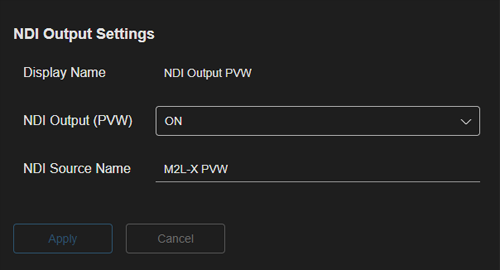
Select a row on the [NDI Settings] tab of the [System Settings] screen and configure each item in the [NDI Output Settings] pane. When finished configuring items, press the [Apply] button to apply the settings.
Setup items
Note
- Depending on the event status, there may be restrictions on modifying the setting of each item.
- The settings cannot be changed for any item while streaming output is in progress.
- Modifying the following items when an event is running will display a confirmation message and cause the event to stop.
- [NDI Output]
- [NDI Source Name]
Hint
- The number of audio tracks that can be output using NDI is PGM/PVW outputs × 8 (max) and CLN output × 1 (max).
- [Display Name]: Displays the name assigned to each output. Cannot be modified.
- [NDI Output]: Select whether to enable output of video to NDI.
- [NDI Source Name]: Set the NDI source name of the video to output. Set different names for each of the three outputs.
TP1001871933
