


About channel settings
On the receiver status screen, select the channel item using the control wheel/button or by tapping it to display the output settings screen for the selected channels.
Configure the output settings on the receiver before starting recording on the camera.
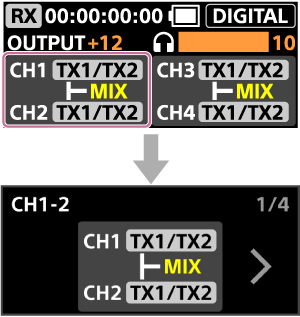
About the MIX/SEP setting
You can set whether to mix the audio signals from multiple microphones into one signal and output it to both channels or output each audio signal to a separate channel.
-
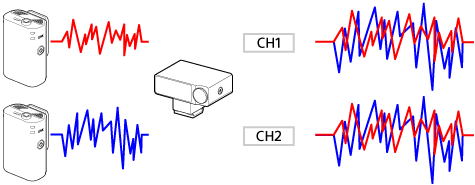
MIX
Outputs the audio signals from multiple microphones as a single mixed signal.
-
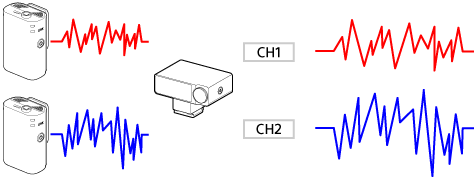
SEP
Outputs the audio signals from each microphone to a separate channel.
Output destination settings
You can output audio signals from multiple microphones to the specified channels.
When using two microphones
Select CH1-2 or CH3-4 as the output destination for audio input from two microphones (TX1 and TX2).
The following example shows how to output audio from two microphones to CH1-2. You can also output audio from the microphones to CH3-4.
| Output destination | MIX/SEP setting | CH1 audio | CH2 audio | CH3 audio | CH4 audio |
|---|---|---|---|---|---|
| CH1-2 | TX1/TX2: MIX | TX1 + TX2 | TX1 + TX2 | — | — |
| CH1-2 | TX1/TX2: SEP | TX1 | TX2 | — | — |
When using two microphones and an external microphone connected to the receiver
Select CH1-2 or CH3-4 as the output destination for audio input from two microphones (TX1 and TX2) and the external microphone.
The following example shows how to output audio from two microphones to CH1-2 and audio from the external microphone to CH3-4. The external microphone is displayed as [3.5]. You can also output audio from the microphones to CH3-4 and audio from the external microphone to CH1-2.
| Output destination | MIX/SEP setting | CH1 audio | CH2 audio | CH3 audio | CH4 audio |
|---|---|---|---|---|---|
| CH1-2 | TX1/TX2: MIX | TX1 + TX2 | TX1 + TX2 | — | — |
| CH1-2 | TX1/TX2: SEP | TX1 | TX2 | — | — |
| CH3-4 | 3.5: MIX | — | — | 3.5 MIC (Stereo) | 3.5 MIC (Stereo) |
| CH3-4 | 3.5: SEP | — | — | 3.5 MIC (Stereo), Left channel | 3.5 MIC (Stereo), Right channel |
When using four microphones
Select CH1-2 or CH3-4 as the output destination for audio input from four microphones (TX1, TX2, TX3, and TX4).
The following example shows how to output audio from microphones TX1 and TX2 to CH1-2 and audio from microphones TX3 and TX4 to CH3-4. You can also output audio from microphones TX1 and TX2 to CH3-4 and audio from microphones TX3 and TX4 to CH1-2.
| Output destination | MIX/SEP setting | CH1 audio | CH2 audio | CH3 audio | CH4 audio |
|---|---|---|---|---|---|
| CH1-2 | TX1/TX2: MIX | TX1 + TX2 | TX1 + TX2 | — | — |
| CH1-2 | TX1/TX2: SEP | TX1 | TX2 | — | — |
| CH3-4 | TX3/TX4: MIX | — | — | TX3 + TX4 | TX3 + TX4 |
| CH3-4 | TX3/TX4: SEP | — | — | TX3 | TX4 |
You can also mix audio from all four microphones and output it to each channel. In this case, change the MIX/SEP setting and make sure that [TX1-4] is displayed.
| Output destination | MIX/SEP setting | CH1 audio | CH2 audio | CH3 audio | CH4 audio |
|---|---|---|---|---|---|
| CH1-2 | TX1-4: MIX | TX1 + TX2 + TX3 + TX4 | TX1 + TX2 + TX3 + TX4 | — | — |
| CH3-4 | TX1-4: MIX | — | — | TX1 + TX2 + TX3 + TX4 | TX1 + TX2 + TX3 + TX4 |
Note
-
If you change the [MODE SELECT] setting after configuring the channels, the channel settings are reset to the default settings. Configure the channels again after changing the [MODE SELECT] setting.