Wireless Microphone/Wireless Receiver/Wireless Transmitter
ECM-W5 / ECM-W5R / ECM-W5T
Help Guide
Table of Contents
Table of Contents
Top
Information for ECM-W5R and/or ECM-W5T customers
Compatible cameras
Compatible headphones
Locating parts and controls
Lamp indications
Preparations
Unpacking
Charging the built-in batteries
Charging the built-in batteries with the charging case
Charging the built-in battery of the receiver/microphone with a USB Type-C cable
Setting the date and time
Attaching the receiver to a camera
Connecting the receiver to a computer or a smartphone
Attaching the microphone to clothing
Attaching the wind screen
Turning on/off the receiver/microphone
Basic operations of the receiver
Operating the receiver
Screen transitions
Microphone status screen
Input microphone setting screen
Receiver status screen
System status screen
Control menu screen
Preventing unintended operations
Bluetooth connection (pairing)
Connecting the microphone to the receiver
Connecting headphones to the receiver
Connecting the microphone to a smartphone/computer
Recording on a camera
Recording audio on a camera using two microphones
Recording audio on a camera using four microphones
Recording audio on a camera using headphones as the microphone
Recording audio on a camera using the external microphone connected to the receiver
Recording audio on a camera using the external microphone connected to the microphone
Setting the sampling frequency and quantization bit depth on the camera
Additional functions
Monitoring audio using headphones
Using the timecode function
Recording audio to the built-in memory of the microphone
Settings
About channel settings
Receiver menu
TIMECODE ON/OFF
TIMECODE SET.
PAIRING
POWER LINK
MISHOE SET.
Built-in REC menu on the microphone
AUTO REC
TX LINK
REC AUDIO SET.
REC LC/NR FILTER
OVERWRITE REC
STORAGE (DELETE)
Headphone menu
MONITOR SET.
BINAURAL
MIRROR
System menu
MODE SELECT
BRIGHTNESS
DATE/TIME
INITIALIZE
TX IDENTIFY
TX LAMP
VERSION
About this unit
About the pickup pattern and the frequency response
Bluetooth
®
Wireless Communication Technology
Notes on use
Specifications
Trademarks
If the message “This accessory is not supported by the device and cannot be used.” is displayed on the camera:
About the pickup pattern and the frequency response
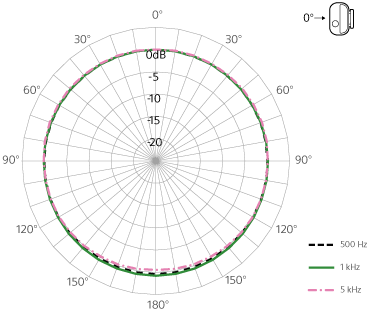
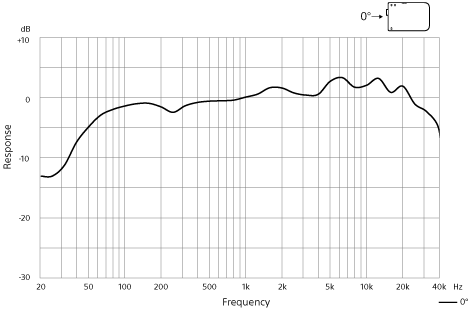
Monaural, Omni-directional
Pickup pattern
Frequency response
Print This Page
Previous
Next
TP1002542205