


Preventing unintended operations
Locking the screen helps prevent accidental operation of the receiver, for example, while carrying it.
- Display the microphone status screen, and then press and hold the control wheel/button on the receiver for 1 second.
“LOCKED” appears on the receiver screen, and the receiver cannot be turned on or off, and operations on the input microphone setting screen and control menu screen are disabled.
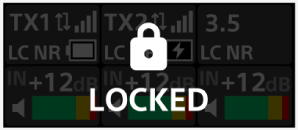
To unlock the screen, display the microphone status screen or the receiver status screen, and then press and hold the control wheel/button for 1 second.
Hint
-
Even when the screen is locked, you can switch between the microphone status screen and receiver status screen.
TP1002542194