


Microphone status screen
Turning on the receiver displays the microphone status screen.
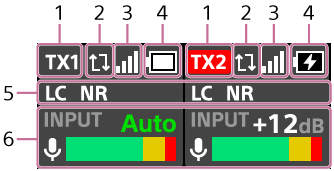
The microphone status screen allows you to check the settings and status of the microphone connected to the receiver.
-
Connected microphones
When two microphones are connected, [TX1] and [TX2] are displayed. When four microphones are connected, [TX1], [TX2], [TX3], and [TX4] are displayed.
The microphone currently recording to its built-in memory is displayed in red. When [RAW] is set for [REC LC/NR FILTER] in the microphone's built-in REC menu, [RAW] is displayed below the name of the microphone to which the setting is applied.
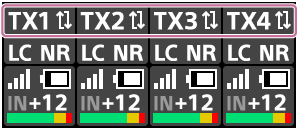
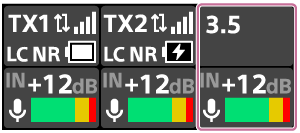
When two microphones are connected, connecting an external microphone (not supplied) or a camera to the audio input jack on the receiver displays [3.5] as the external input.
-
OVERWRITE REC setting
When [OVERWRITE REC] is set to on, the arrows are displayed.
For details, see “OVERWRITE REC.”
-
Communication strength between the microphone and the receiver
-
Microphone battery level
-
LC filter/NR (Low Cut/Noise Reduction) settings
-
Input gain level meter
Selecting this item with the control wheel/button, or tapping it displays the input gain setting screen, where you can change the input gain.
Note
-
When the sampling frequency and quantization bit depth on the camera are set to “24 bit/96 kHz,” [3.5] is not displayed even if an external microphone or camera is connected to the audio input jack on the receiver.
To change the microphone/external microphone settings
-
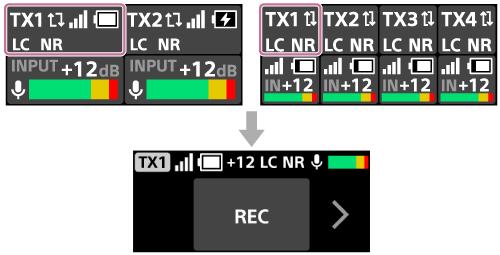
Selecting the name of a connected microphone or an external microphone with the control wheel/button, or tapping the name, displays the input microphone setting screen for the selected microphone.
For details, see “Input microphone setting screen.”
-
Selecting the input gain/level meter with the control wheel/button, or tapping it, displays the input gain setting screen.
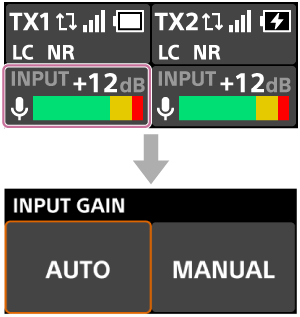
You can select [AUTO] or [MANUAL] for the input gain setting.
When set to [AUTO], the input gain is adjusted automatically.
When set to [MANUAL], you can adjust the input gain value manually.