


Setting the date and time
Operate the receiver to set the date and time.
For details about operating the receiver, see “Operating the receiver.”
- Press and hold the ON/OFF (Power) button on the receiver for 2 seconds to turn on the receiver.
- When the microphone status screen appears on the receiver's display, swipe up from the bottom of the screen.
The control menu screen is displayed.
- Turn the control wheel/button to the right to select [SYSTEM], and then press the button to confirm the selection.

The system menu is displayed.
- Turn the control wheel/button to the right to select [DATE/TIME], and then press the button to confirm the selection.
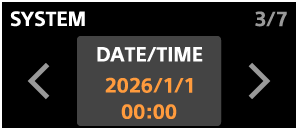
- Tap the left side of the screen to set the date.
Set the year, month, and day in that order, and select the date display format from the following options in [DATE FORMAT].
-
YYYY/MM/DD
The date is displayed as year/month/day.
-
MM/DD/YYYY
The date is displayed as month/day/year.
-
DD/MM/YYYY
The date is displayed as day/month/year.
Tapping
 (Back) on the screen to return to the previous screen.
If you do not change the setting, briefly press the ON/OFF (Power) button on the receiver to return to the previous screen.
-
- Tap the right side of the screen to set the time.
Set the hour and minute in that order.
TP1002542243