


TIMECODE SET.
This section describes [TIMECODE SET.] in the receiver menu.
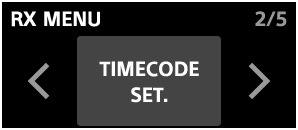
In [TIMECODE SET.], you can configure the following settings for the timecode function.
-
FRAME RATE
Select the frame rate from the following options according to the settings of the device to be synchronized with the timecode.
- 23.98fps
- 24fps
- 25fps
- 29.97fps DF
- 29.97fps
- 30fps
-
COUNT MODE
Select the timecode display format.
[REAL TIME]:
Displays the timecode in the [HH:MM:SS:FF] (hours/minutes/seconds/frames) format based on the time set on the receiver.
[COUNT UP]:
Starts counting up from [00:00:00:00]. Select
 (Reset) to reset the counter.
 -
OUTPUT MODE
Select the timecode output mode.
[AUDIO OUT]:
Outputs the timecode signal in audio timecode format. You can select [CH2] or [CH4] as the output destination.
When the receiver is used in any of the following cases where 4-channel output is not supported, setting [CH2] is recommended. If [CH4] is set, the timecode signal is not output.
-
The receiver is connected to the Multi Interface Shoe of a camera that does not support a digital audio interface using an analog connection.
-
The receiver is connected to a USB audio-compatible device using a USB connection and outputs USB audio.
-
The receiver's microphone out jack is connected to the camera's microphone input jack using a commercially available 3.5 mm TRS audio cable.
When the receiver is connected to the Multi Interface Shoe of a camera that supports a digital audio interface, you can select [CH4].
[USB SYNC]:
Outputs synchronized timecode by directly connecting the receiver to the camera using a USB Type-C cable. This option is available when the connected camera supports this function.
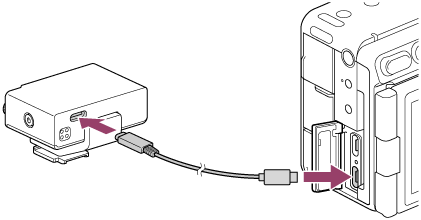
When connecting the receiver to a compatible camera, use a USB Type-C cable (USB-C to USB-C) that supports USB 3.0 or later or data transfer speeds of 5 Gbps or higher.
For details about the settings on the compatible camera, refer to the operating instructions supplied with the camera.
-
Note
-
If the receiver's time setting is changed while using the timecode function, the new time is not immediately reflected in the timecode. To reflect the new time in the timecode, perform one of the following operations.
-
Set [TIMECODE ON/OFF] to [OFF] and then back to [ON].
-
Set [COUNT MODE] to [COUNT UP] and then back to [REAL TIME].
-
-
When [OUTPUT MODE] is set to [AUDIO OUT], a very loud timecode signal is output to devices connected to the receiver, such as a camera. Do not monitor this signal through devices connected to the receiver.
-
As of September 2026, only ILME-FX5 supports [USB SYNC] (Timecode synchronization) via a USB Type-C cable. For compatibility with cameras released after that, check the following website.
-
If you connect the receiver to another device using a USB cable while the receiver is attached to the Multi Interface Shoe on a camera, the connection between the camera and receiver via the Multi Interface Shoe will be disconnected.