


Guide to parts and controls
Main unit
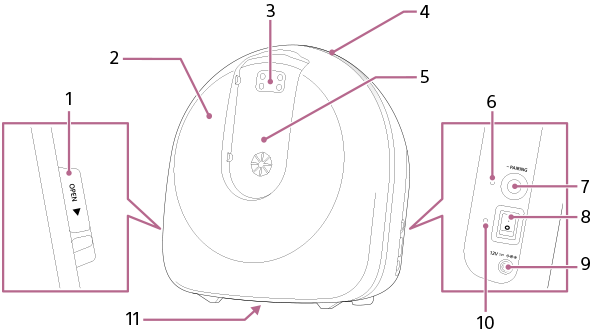
-
Front cover OPEN lever
When attaching or replacing the cartridge, slide the OPEN lever to remove the front cover.
-
Front cover
Open the front cover, remove the cartridge cover, and attach or replace the cartridge.
-
Odorant release port
Odorants are released from this port.
-
LED section
The LED indicates the status of the odorant release (LED guide).
LED color LED status Main unit status White Blinks Countdown to odorant release (3 seconds) Blue Lit up Odorant release underway Blue Blinks Checking the connection with the dedicated tablet -
Nose guide/odorant release port cover installation area
Install a nose guide whenever the unit is in use and replace it with a new nose guide for each user.
When not in use, install the odorant release port cover.
-
Bluetooth® indicator
Indicates the connection status between the unit and dedicated tablet.
Indicator color Indicator status Connection status Blue Lit up Bluetooth connection established Blue Blinks quickly Checking the connection Blue Blinks slowly Pairing 
Off Bluetooth connection not established -
PAIRING button
Use this button when severing the Bluetooth connection between the unit and dedicated tablet. Use the “Scent Canvas” app to reconnect the unit and dedicated tablet.
-
Power switch
Turns the power on and off.
-
Power terminal

Connects the AC adapter.
-
Power indicator
Indicates the power status.
Indicator color Indicator status Power status Green Lit up Power is turned on
Off Power is turned off - Device name plate
Tablet
Please see the Operating Instructions for the dedicated tablet.