


Result Log
Check the process execution results.
Perform the result log operation in Administrator Mode.
- Tap
 (Settings) in the upper right part of the “Scent Canvas” app Home screen followed by the [Admin Mode]
  (On/Off) switch to turn Administrator Mode on.
 - Tap [
 Result Log] under (Settings) in the upper right part of the Home screen.
The saved data is displayed in a list.
- Tap the
 (Select button) to the left of the data to check (up to five logs can be selected).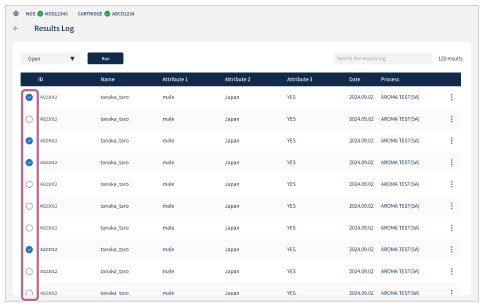
- Choose [Open] from the dropdown menu in the upper left part of the screen and tap [Run].
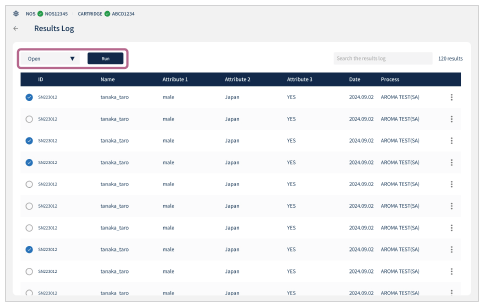
- Check the result log.
- When the check is finished, tap
 in the upper right part of the screen.
To filter the result logs with search keywords
Enter a user ID as a keyword in the search field in the upper right part of the screen to filter the result logs to the target data.
To delete data from the result logs
Tap the (Select button) to the left of the data that you wish to delete and choose [Delete] from the dropdown menu in the upper left part of the screen, and tap [Run]. You can also choose [Delete] from the  (Menu) to the right of the data to delete the entry.