


Basic Settings
Configure the settings involved in odorant release during process execution.
Configure the basic settings in Administrator Mode.
-
Tap
 (Settings) in the upper right part of the “Scent Canvas” app Home screen followed by the [Admin Mode]
  (On/Off) switch to turn Administrator Mode on.
 -
Tap [
 Basic Settings] under (Settings) in the upper right part of the Home screen.
 -
Set each item.
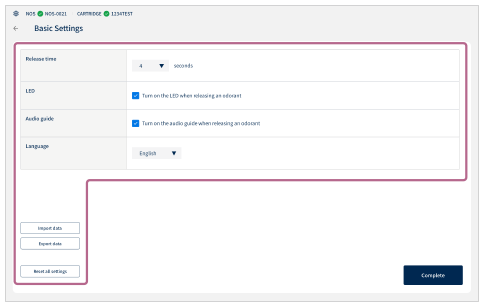
- Release time: Set the duration of the release time of the odorant (1 to 10 seconds).
- LED: Check the box to set whether to indicate the odorant release timing with LED blinking.
- Audio guide: Check the box to set whether to play the voice guidance during process execution.
- Language: Select the language to be used.
- Import data: Batch import process data and various settings.
- Export data: Batch export process data and various settings.
- Reset all settings: Tap to return the settings to the values at the time of purchase.
-
Tap [Complete].