


Canceling the Speaker Add function
Follow the steps below to cancel the Speaker Add function.
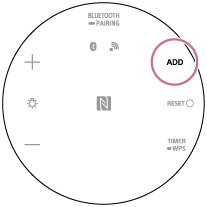
- Press and hold the ADD (Speaker Add function) button for at least 2 seconds.
A sound* will indicate when the setting has been canceled.
Hint
-
If a portable audio device, etc. is connected to the AUDIO IN jack, the speaker automatically switches to AUDIO IN mode, and the Speaker Add function is terminated.
Note
-
Turning off the speaker does not cancel the Speaker Add function.
