


Monitoring the Streaming Status
You can monitor the status of each input/output on the [Input] tab and [Output] tab of the [System Settings] screen on the [Streaming Monitor] screen.
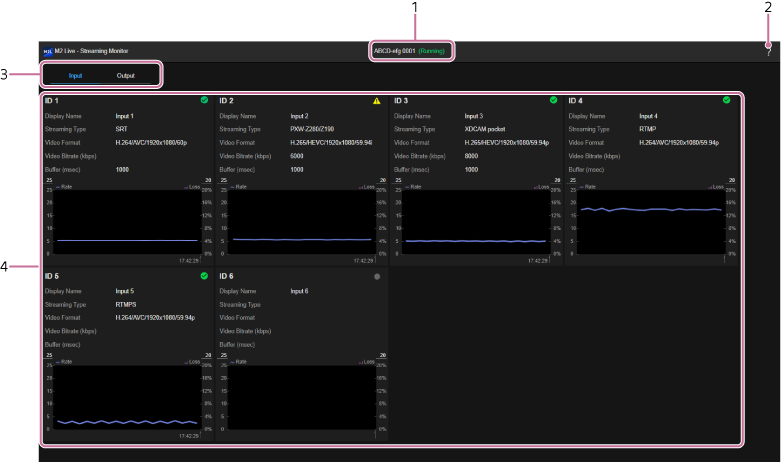
[Input] tab
[Output] tab
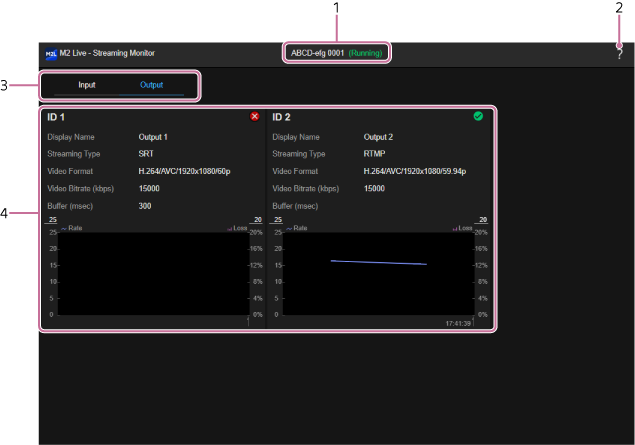
- Event name/status display: Displays the name/status of the event for which the [Streaming Monitor] screen was opened.
-
 (Help Guide): Select to display this Help Guide.
 -
Category tabs: Press a tab to switch the display contents.
- [Input]: Displays the status of the input source.
- [Output]: Displays the status of the output destination.
-
[ID 1] to [ID 6]: Displays the settings of the streaming input source device assigned on the [System Settings] screen and indicates the communication status using an icon and graph.
-
Icon display
-
 (Normal): Streaming input in progress.
 -
 (Caution): Streaming input in progress when both [Streaming Type] is [XDCAM pocket] and the frame rate settings are different.
 -
 (Error): Streaming input stopped or an error occurred after streaming had been in progress.
 - No display: No streaming input.
-
- [Display Name]: Displays the name specified when the device was assigned.
- [Streaming Type]: Displays the streaming type.
- [Video Format]: Displays the video format.
- [Video Bitrate (kbps)]: Displays the video bit rate. Displayed only when [Streaming Type] is [PXW-Z280/Z190] or [XDCAM pocket].
- [Buffer (msec)]: Displays the buffer size. Displayed only when [Streaming Type] is [PXW-Z280/Z190], [XDCAM pocket], or [SRT].
- Graph: Displays the communication rate and loss graph.
-
Icon display
-
[ID 1], [ID 2]: Displays the settings of the streaming output destination device or service assigned on the [System Settings] screen and indicates the communication status using an icon and graph.
-
Icon display
-
(Normal): Streaming output in progress.
-
(Error): Streaming output stopped due to an error or other cause.
- No display: No streaming output.
-
- [Display Name]: Displays the name specified when the device or service was assigned.
- [Streaming Type]: Displays the streaming type.
- [Video Format]: Displays the video format.
- [Video Bitrate (kbps)]: Displays the video bit rate.
- [Buffer (msec)]: Displays the buffer size. Displayed only when [Streaming Type] is [SRT].
- Graph: Displays the communication rate and loss graph.
-
Icon display
Graph operations
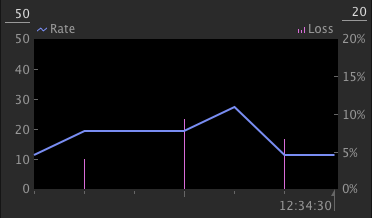
The graph is updated every second. Hover the mouse pointer over the graph to check the graph details.
You can change the upper limit of each vertical axis of the graph by selecting the numerical value at the top of the graph. The maximum value for the communication rate on the left can be set in the range 10 to 50. The maximum value for the loss on the right can be set in the range 10 to 100.
