


Setting PinP
PinP is a function for compositing another video as a subscreen on a video. One subscreen can be composited against the background video.
-
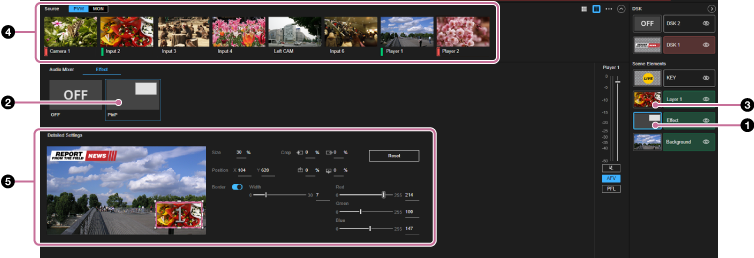
Select the thumbnail for the [Effect] layer in the [Layer] pane.The [Effect] tab and its setup items are displayed in the Edit/Control pane.
-
Select [PinP] from the list of presets.
The thumbnail on the [Effect] layer in the [Layer] pane changes to the image of the selected preset. The [Layer 1] layer appears above the [Effect] layer.
Hint
- When [OFF] is selected in the list of presets, the preset selection is released and the [Layer 1] layer is closed in the [Layer] pane. If the [Layer 1] layer content is being displayed in the output video, it will be hidden.
-
Select the thumbnail for the [Layer 1] layer in the [Layer] pane.
-
Select the video source to composite as the subscreen in the [Source] pane.If the [Layer 1] layer is being displayed in the output video, the selected image is composited against the background video and is displayed in the [PVW] pane.
-
You can make adjustments to the subscreen as required.For details about adjustment, see “Adjusting Composited Content.”
