


Structure of the [Replay] Tab
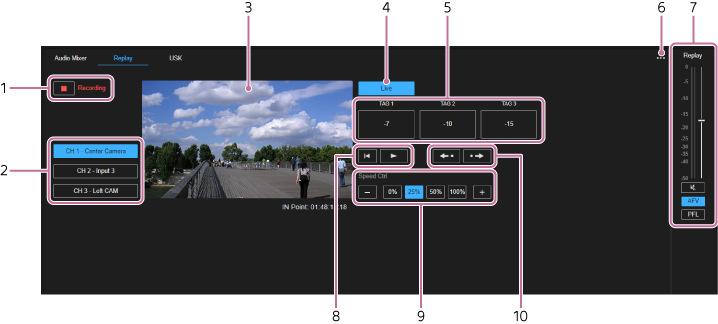
-
 (Start recording)/
 (Stop recording)
: Press (Start recording) to start internal recording for instant replay. During recording, the button changes to (Stop recording) and “Recording” is displayed on the right side. Various operations are also enabled for instant replay. Press (Stop recording) to stop recording.
(Stop recording)
: Press (Start recording) to start internal recording for instant replay. During recording, the button changes to (Stop recording) and “Recording” is displayed on the right side. Various operations are also enabled for instant replay. Press (Stop recording) to stop recording.Note
- During ISO recording, (Stop recording) is disabled.
- During ISO recording,
- Channel selection buttons: Selects the channel to display in the monitor. The channel to use for instant replay must be configured beforehand on the [System Settings] screen.
-
Monitor: Displays live video or playback video for the selected channel. Live video is automatically displayed when internal recording for instant replay use is not taking place.
A green frame is displayed around the monitor when [Replay] is set as the preview output, and a red frame is displayed when [Replay] is set as the program output. - [Live] button: Selects live video for the selected channel for display in the monitor.
-
[TAG 1] to [TAG 3] buttons: Sets the IN point for the video displayed in the monitor. The IN point is set to the point in time after skipping back by the number of seconds displayed on each button at the time the button is pressed.
You can change the number of seconds configured for each button. -
 (Options):
- [TAG Presets]: Select to display the [TAG Presets] dialog. You can register IN point positions to set when the [TAG 1] to [TAG 3] buttons are pressed.
- Audio adjustment pane: Use to adjust the volume and monitor the audio level of the instant replay. Audio is only available with instant replay when the playback speed is 100%.
-
Video control buttons: Press
 (Move to IN point) to cue up the video of the selected channel to the IN point and then pause.
Press (Play) to play the video of the selected channel at the configured playback speed. The button changes to
  (Pause). Press (Pause) to pause.
 -
Playback speed adjustment buttons: Specify the instant replay playback speed using the [0%], [25%], [50%], and [100%] buttons. You can also increase/decrease the playback speed in 1% increments using the [+]/[−] buttons.
Hint
- During instant replay playback, changes to the playback speed are applied immediately. If an instant replay is not being played, the change is stored and applied during the next playback.
-
IN point control buttons: Press
 (Move IN point back) to move the IN point back by approximately 1 second, cue up the video at the IN point, and then pause. Press
  (Move In-point forward) to move the In-point forward by approximately 1 second, queue up the video at the In-point, and then pause.
