


Setting a KEY
A KEY is used when you want to manually show/hide a composited image against a video. Only one image can be set for the [KEY] layer.
To set an image in the KEY, the image must be uploaded to this service using the [File Manager] screen beforehand.
-
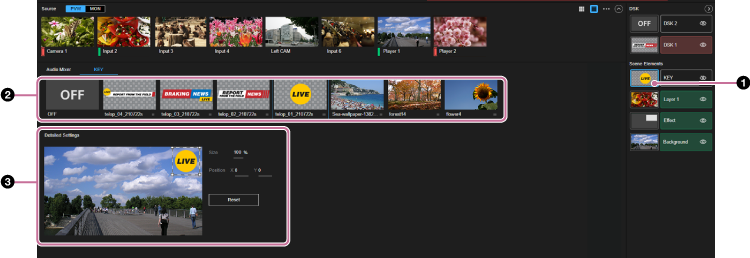
Select the thumbnail for the [KEY] layer in the [Layer] pane.The [KEY] tab and its setup items are displayed in the Edit/Control pane.
-
Select the image to set in the KEY from the images uploaded to this service.
If the [KEY] layer is displayed in the preview output, the selected image is composited against the background video and is displayed in the [PVW] pane.
Hint
- When [OFF] is selected, the image assignment is released. If the [KEY] layer is being displayed in the output video, it will be hidden.
-
Make adjustments to the KEY image as required.For details about adjustment, see “Adjusting Composited Content.”
