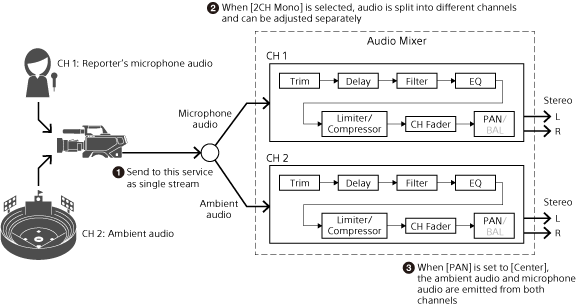
Handling 2-Channel Monaural Content
For input content with different input audio on two stereo channels (2-channel monaural content), you can adjust the audio of the two channels separately. Use this when you want to input ambient audio on one channel and input microphone audio on the other channel and adjust the audio of both channels separately.
Configuration method
Configure the settings in the [Input Settings] dialog.
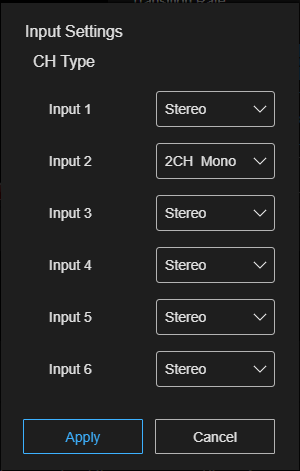
Click  (Options) at the top right of the [Audio Mixer] tab and select [Input Settings] to display the [Input Settings] dialog.
In the [Input Settings] dialog, select [2CH Mono] in the pull-down list for the input content whose two channels of audio you want to adjust separately. Press the [Apply] button to close the [Input Settings] dialog. The items for the input content for which [2CH Mono] is selected are displayed separately as [CH1] and [CH2] on the [Audio Mixer] tab.
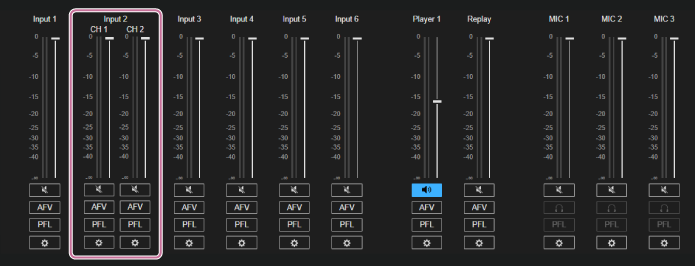
Hint
- By setting [PAN] to [Center] for both [CH1] and [CH2], both [CH1] and [CH2] can be output equally to both stereo channels. The [PAN] settings are configured on the settings screen displayed by pressing
 (Adjust) on the [Audio Mixer] tab.