


Changing the Settings of the [TAG 1] to [TAG 3] Buttons
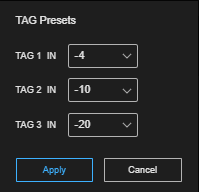
You can change the number of seconds to skip back when you press the [TAG 1] to [TAG 3] buttons to set an IN point. To change a setting, select [TAG Presets] in  (Options) at the top right of the [Replay] tab to display the [TAG Presets] dialog. Specify the number of seconds to skip back for each button and press the [Apply] button. Specify a value in the range −20 to −4.
When the set value is changed, the display on the [TAG 1] to [TAG 3] buttons also changes.
Hint
- The settings of the [TAG 1] to [TAG 3] buttons are stored for each user. This does not affect other users using the same event.
