


Using a USB Charger
You can connect the unit to an AC power source using a USB charger (20 V/5 A compatible product) for use without worrying about the need to recharge the battery pack.
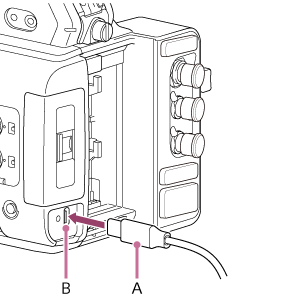
Connect the USB charger (A) to the DC IN connector (B) on the unit, and connect the charger to an AC power source.
If the output voltage from the USB charger becomes low
If the output voltage from the USB charger falls below a certain level during operation ([DC Low Voltage1] state), a message appears informing you that the USB charger output voltage has dropped, and the recording/tally lamp starts flashing.
If the output voltage from the USB charger falls below the level at which operation cannot continue ([DC Low Voltage2] state), a message appears informing you that the USB charger output voltage is too low.
If this occurs, the USB charger may be faulty. Check the USB charger, as required.
Changing the warning voltages
The [DC Low Voltage1] level is set to 18.5 V and the [DC Low Voltage2] level is set to 18.0 V by factory default. You can change the warning level settings using [Technical] – [Camera DC IN Alarm] in the full menu.
About USB chargers
- Do not connect and use a USB charger in a confined space, such as between a wall and furniture.
- Connect the USB charger to the nearest AC power source. If a problem occurs during operation, immediately disconnect the power cord from the AC power source.
- Do not short-circuit the metal parts of the plug of the USB charger. Doing so will cause a malfunction.
- The battery cannot be charged while attached to the unit, even if the USB charger is connected.
- When disconnecting the USB charger from the unit, grasp the plug and pull it straight out. Pulling on the cable may cause a malfunction.
- Use a USB charger for which both the adaptor and cable support 20 V/5 A or higher.
- Do not connect any devices other than the unit to the adaptor, even if it has multiple ports, as doing so may cause a malfunction.