


Selecting a Look
A “look” can be created by adding adjustments, such as black and matrix, to a base look.
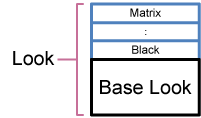
You can also quickly select a different look by saving different combinations of settings in scene files.
The unit is provided with a total of seven preset looks as scene file factory defaults.
- With the shooting screen displayed, press the multi-function dial.
-
Select the
 (scene file) icon.
- Press the multi-function dial.
- Select the desired look from the menu, and press the multi-function dial.
Hint
-
The following presets are configured by factory default.
[Target Display] [SDR] [HDR] Scene file 1 [S-Cinetone] [HLG Live] Scene file 2 [ITU709] [HLG Mild] Scene file 3 [709tone] [HLG Natural] Scene file 4 (Not registered) [S-Log3] Scene files 5 to 16 (Not registered) (Not registered) - You can also select a look using [Paint/Look] – [Scene File] – [Recall Internal Memory] in the full menu. You can also recall a preset look using [Scene File] – [Preset Recall].
TP1002070997