


Auto Framing
Auto framing is a function where the camera recognizes people and then crops, records, and outputs an image that matches pre-configured compositions.
During live shooting, you can use the footage cropped using the auto-framing function for live streaming, while leaving the uncropped footage as a clip to use as package media content.
Set framing using [Auto Framing] on the [Project] status screen or set [Project] – [Auto Framing] – [Setting] to [On] in the full menu and configure the following.
Cropped image output destination
-
Recorded video and streaming output video:
Set using [Project] – [Auto Framing] – [Rec/Stream] in the full menu.
-
HDMI output video:
Set using [Project] – [Auto Framing] – [HDMI] in the full menu.
Methods for specifying the object to track
Set using [Project] – [Auto Framing] – [Tracking Start Mode] in the full menu.
[Manual]: Manually specify the person to track. Use this method if you want to zoom in with arbitrary timing or if you want to select a particular person among multiple people.
[Auto]: A person near the center of the image has priority as the tracking target.
People framing size
Set using the [Project] status screen or [Project] – [Auto Framing] – [Crop Level] in the full menu.
The framing varies as follows depending on the [Crop Level] setting
[Large Crop Level]:
Crop level such that the person appears large in the image.
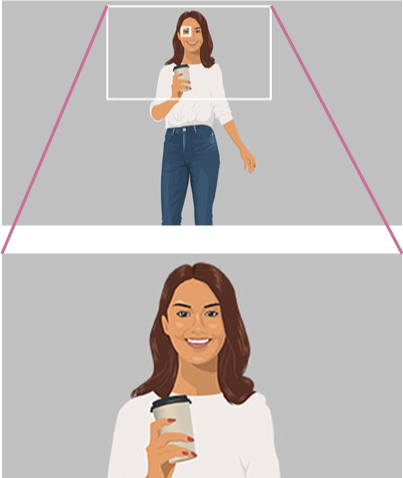
[Medium Crop Level]:
Crop level such that the person appears medium-sized in the image.
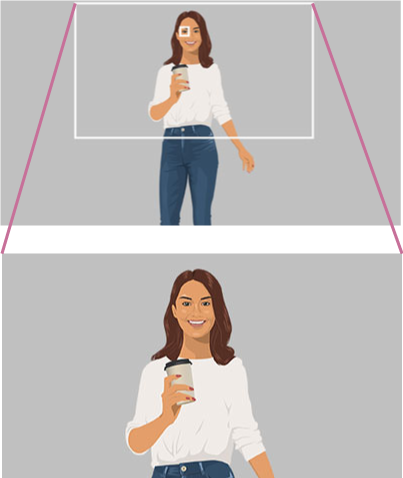
[Small Crop Level]:
Crop level such that the person appears small in the image.
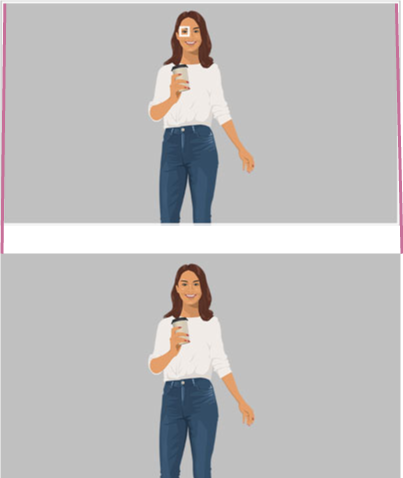
Speed of tracking people
Set using the [Project] status screen or [Project] – [Auto Framing] – [Tracking Speed] in the full menu.
Production effect
You can add variety to an image by slowly zooming in and out, even if there is little change in the image, such as when people are barely moving.
Set using [Project] – [Auto Framing] – [Production Effect] in the full menu.
Hint
- You can press an assignable button assigned with [AFR Tracking Stop] to stop auto framing while maintaining the crop position.
- You can press an assignable button assigned with [AFR/MFR Stop (Full)] to pause framing and switch to full-angle view. You can reset the tracking target and restart auto framing by pressing the button again if [Auto Framing] – [Tracking Start Mode] is set to [Auto]. This can be convenient in situations where the composition deviates from the intended composition.
- You can press an assignable button assigned with [AFR Restart] if [Auto Framing] – [Tracking Start Mode] is set to [Auto] to reset the tracking target and start over from the beginning.
- You can press an assignable button assigned with [AFR Settings] to configure the [Crop Level] and [Tracking Speed] settings.
Note
- The image may not be cropped with the optimal framing, depending on the shooting conditions.
- SDI output is not available while this function is enabled.
- The digital extender function is not supported while this function is enabled.
- The imager operates at 4K size regardless of the configured recording format. Accordingly, the brightness (sensitivity) of the image may change when this function is enabled.