


Recording Video Intermittently (Interval Rec)
The Interval Rec function allows you to capture video at regular intervals to internal memory of the unit. This function is an effective way to shoot slow-moving subjects. When you start recording, the unit automatically records a specified number of frames ([Number of Frames]) at a specified interval time ([Interval Time]).
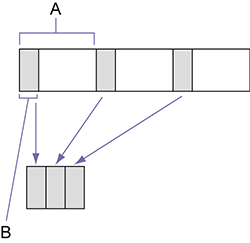
A: Shooting interval ([Interval Time])
B: Number of frames recorded per take ([Number of Frames])
When Interval Rec is enabled, the HVL-LBPC (option) video light automatically turns on before recording starts, which allows you to record pictures under stable light and color temperature conditions (pre-lighting function).
Note
- Only one special recording function, such as Interval Rec recording, can be used at any one time.
- If another special recording mode is enabled while Interval Rec is in use, Interval Rec is automatically released.
- Interval Rec mode is automatically released after changing system settings, such as the video format.
- Interval Rec settings cannot be changed during recording or playback, or when the thumbnail screen is displayed.
- If the maximum clip recording time elapses when shooting in Interval Rec mode, recording ends without continuing.
- Relay recording is not supported in Interval Rec mode.
To set Interval Rec
Set [Rec Function] to [Interval Rec] on the [Project] status screen, and set [Number of Frames] and [Interval Time].
Hint
- [Number of Frames] and [Interval Time] can also be configured using [Project] – [Interval Rec] in the full menu.
Note
- If you want to turn the video light on before the start of recording, set the video light switch to AUTO.
- If you set the video light switch to ON, the video light is always lit (video light does not turn on/off automatically).
- If the video light is configured so that it will turn off for a duration of 5 seconds or less, the video light does not turn off.
When the unit is turned off, Interval Rec mode is cancelled, but the [Number of Frames] and [Interval Time] settings are retained. You do not need to set them again the next time you shoot in Interval Rec mode.
To shoot using Interval Rec
Press the record START/STOP button to start recording. “Int  Rec” and “Int Stby” appear alternately on the LCD monitor.
If you are using the pre-lighting function, the video light turns on before recording starts.
To stop shooting
Stop the recording.
When shooting ends, the video data stored in memory up to that point is written to the media.
To exit Interval Rec mode
Do one of the following.
- Set the power switch to the off position.
- In standby mode, set [Rec Function] to a setting other than [Interval Rec] on the [Project] status screen.
Also, Interval Rec mode is automatically released when the unit is restarted.
Limitations during recording
- Audio is not recorded.
- Reviewing the recording (Rec Review) is not possible.
If the unit is turned off
- If the power switch on the unit is set to the off position, the media is accessed for several seconds to record the images stored in memory up till that moment, and then the power turns off automatically.
- If power is lost because the battery was removed, the DC power cord was disconnected, or the power was turned off from the USB charger, the data shot up to that point may be lost (maximum 10 seconds). Care should be exercised when exchanging the battery.