


Screen Display
During shooting (recording/standby) and playback, the status and settings of the unit are superimposed on the image.
You can show/hide the information using the DISPLAY button. Even when hidden, the display will appear while performing direct menu operations.
You can also select to show/hide each item independently.
Information displayed on the screen while shooting
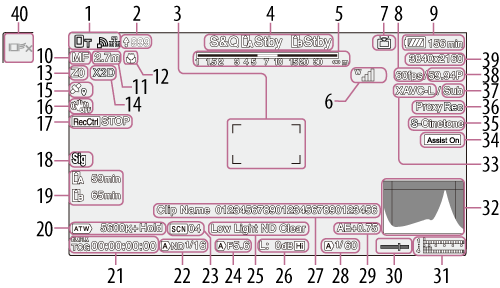
-
Network status
Displays the network connection status as an icon.
- Upload progress/Remaining files
-
Focus area
Displays the focus area for auto focus.
-
Slot A/B recording mode/Operating status, Slow & Quick Motion, clip continuous recording mode, interval recording interval display
Display Meaning  Rec
RecRecording Stby Recording standby - Depth of field
-
UWP-D series status
Displays the RF level signal strength as an icon when a UWP-D series device is connected to the MI shoe configured for digital audio transfer.
-
Streaming status
For SRT streaming, the ARC bit rate is also displayed.
Display Meaning 
Streaming transmitting status 
Switching to streaming transmitting status 
Streaming not transmitting status due to an error  USB
USBUSB streaming not transmitting status
(“USB” flashing display)USB streaming transmitting status
(“USB” lit display) - Slow & Quick Motion shooting frame rate
- Remaining battery capacity/DC IN voltage
-
Focus mode
Display Meaning 
[Focus Hold] mode 
Full MF mode 
MF mode 
AF mode 
Realtime tracking AF mode Subject recognition AF (AF/  /
/ /
/ /
/ )
)
Human detection icon
Human only detection AF icon
Saved tracking face icon
AF paused icon1) 1)Displayed during auto focus operation when auto focus operation cannot continue and temporarily stops. The icon disappears when the cause for stopping auto focus operation is resolved and then auto focus operation resumes.
-
Focus position
Displays the focus position.
-
Focus macro indicator
Displays the focus macro on/off status.
-
Zoom position
Displays the zoom position in the range 0 (wide angle) to 99 (telephoto).
The display can be changed to a bar indicator.
-
Digital extender
Displays the zoom ratio of the digital extender function.
Displayed when the digital extender is turned on.For details about the digital extender, see “Using the Digital Extender” in “Adjusting the Zoom.”
-
GPS status indicator
Display Meaning 
Location data is within the validity period. 
Location data is outside the validity period. 
Location data linking is not possible due to invalid settings. - Image stabilization mode
-
SDI output/HDMI output [Rec Control] status
Displays the output status of the SDI/HDMI output signal.
-
Digital signature indicator
Display Meaning 
Digital signature is valid. 
Digital signature is valid and the certificate for C2PA is loaded. -
Memory card remaining capacity
Display Meaning 
Mounting/mount status ([Media(A)]) 
Mounting/mount status ([Media(B)]) 
Mounting/mount status ([Media(B)])1)
(flashing)Mount status (non-recordable) ([Media(B)])1) 2) 1)Recording proxy clip only
2)An error or insufficient remaining capacity warning occurred at the start of recording or during recording.
A
 (Protected) icon appears if the memory card is write-protected.
 -
White balance mode
Display Meaning 
Auto mode [Hold]Auto mode paused W:P Preset mode W:A Memory A mode W:B Memory B mode -
Timecode external lock/Time data
Displays “EXT-LK” when locked to the timecode of an external device.
-
ND filter
Display Meaning 
Auto mode - Scene file
-
Iris
Displays the iris position (F-number).
Display Meaning
Auto mode - Video level warning
-
Gain
Displays the gain value.
Display Meaning
Auto mode 
High sensitivity mode H Preset H mode M Preset M mode L Preset L mode T Turbo gain mode
Temporary adjustment mode -
Clip name
Displays the name of the clip being recorded or to record next.
-
Shutter
Display Meaning
Auto mode -
AE mode/AE level
Display Meaning 
Standard mode 
Backlight mode 
Spotlight mode -
Spirit level
Displays the horizontal level in ±1° increments up to ±15°.
-
Audio level meter
Displays the audio level of CH1 to CH4.
-
Video signal monitor
Displays a waveform, vectorscope, and histogram.
The orange line indicates the set value of the zebra level.
Network speed indicator
Displays the current communications speed for each network path. Not displayed when the video signal display is displayed.
-
Recording format (codec) indicator
Displays the name of the format for recording on the memory cards.
-
Gamma display assist/Base look
Displays the gamma display assist status. The gamma display assist function can be turned on/off using an assignable button assigned with [Gamma Display Assist].
-
Recording video indicator
Displays the base look setting.
-
Proxy status
Display Meaning 
Proxy recording on 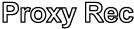
Proxy recording
(flashing)Proxy recording not ready 
Proxy chunk recording on 
Proxy chunk recording
(flashing)Proxy chunk recording not ready - 4K & HD (Sub) recording indicator
- Recording format (frame rate and scan method) indicator
-
Recording format (picture size) indicator
Displays the picture size for recording on the memory cards.
- Realtime tracking AF stop button
Information displayed on the screen during playback
The following information is superimposed on the playback picture.
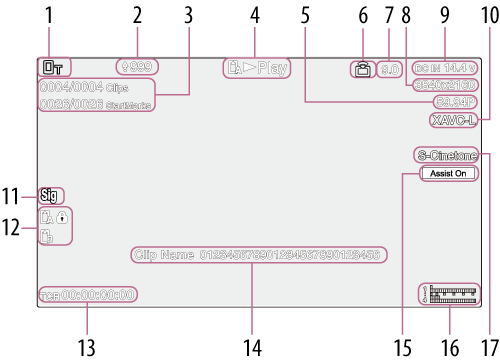
- Network status
- Upload progress/Remaining files
- Clip number/Total number of clips
- Playback status
- Playback format (frame rate and scan method)
- Streaming status
-
Bit rate
Displays the bit rate for SRT streaming when [ARC] is set to [On]. The display flashes if the bit rate falls below the value set by the ARC function.
- Playback format (picture size)
- Remaining battery capacity/DC IN voltage
- Playback format (codec)
- Digital signature indicator
-
Memory card
A
(Protected) icon appears if the memory card is write-protected. - Time data
- Clip name
-
Gamma display assist
Displays the gamma display assist status.
-
Audio level meter
Displays the playback audio level.
-
Playback clip recording gamma
Displays the recording gamma if the playback clip was recorded with [HLG] or [S-Log3].
Icons
Network connection icons
If an icon is flashing, press the NETWORK button to check the status on the [Network] status screen.
For details, see “Checking the Network Connection Status.”
| Network mode | Connection status | Icon |
|---|---|---|
| Access point mode | Operating as an access point |

|
| Access point operation error |
 (Icon flashing) (Icon flashing) |
|
| Station mode | Wi-Fi connected Wi-Fi signal strength (4 levels) |

|
| Wi-Fi disconnected (including when establishing connection) |
 (Icon flashing) (Icon flashing) |
|
| Wi-Fi connection error |
 (Icon flashing) (Icon flashing) |
|
| Wired LAN | Wired LAN connected |

|
| Wired LAN disconnected |
 (Icon flashing) (Icon flashing) |
|
| Wired LAN error |
 (Icon flashing) (Icon flashing) |
|
| USB tethering | USB tethering connected |

|
| USB tethering disconnected |
 (Icon flashing) (Icon flashing) |
|
| USB tethering error |
 (Icon flashing) (Icon flashing) |
|
| Bluetooth | Bluetooth function on |

|
UWP-D series icons
| Transmitter status | Receive status | Icon |
|---|---|---|
| Power off | Not receiving |

|
| Normal transmit status | Receiving |
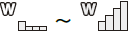
(4-level signal strength indicator) |
| Muting status | Receiving (muted) |

|
| Remaining battery capacity warning status | Receiving |

(Icon flashing) |
| Muting and remaining battery capacity warning status | Receiving |

(Icon flashing) |