


Adjusting the Focus Manually
Adjusting in Full MF mode
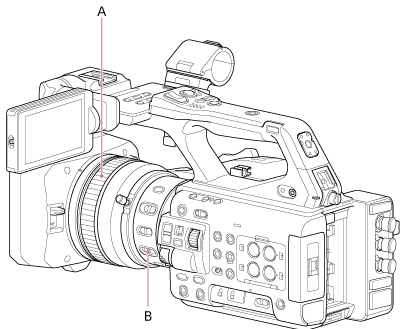
Pull the focus ring (A) rearward (toward the unit) to select Full MF (full manual focus) mode for adjusting the focus manually only.
Turn the focus ring while viewing the image on the LCD monitor to adjust the focus.
In Full MF mode, you can adjust the focus using the distance scale printed on the focus ring.

The focus distance corresponds to the position on the distance scale.
Note
- When turning the focus ring, do not apply excessive force at both ends of the ring movement.
- During Full MF mode operation, auto focus and push auto focus are not available.
Adjusting in MF mode
MF (manual focus) mode supports use of auto focus when necessary only. Slide the focus ring (A) forward (lens hood side) and set the FOCUS switch (B) to the MANUAL position.
Turn the focus ring (A) to adjust the focus manually according to the shooting conditions.
Manual focusing is useful for the following types of subjects.
- Subjects on the far side of a window covered in water droplets
- Subjects with low contrast against the background
- Subjects further away than nearby subjects
- When focus is lost due to a large change in the ambient temperature (changes due to the temperature characteristics of the lens)
Hint
- You can also use auto focus by setting the FOCUS switch to the AF position when manual adjustment is the main method of operation.
TP1002070952