


Left Side/Front Side
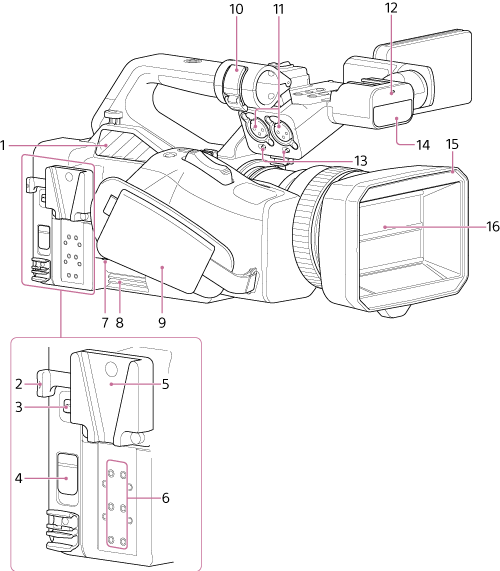
-
Air outlet
Note
- Do not cover the air outlet.
- Exercise caution as the area near the air outlet will be hot.
- V-shoe mount release lever
-
REF/TC IN/OUT switch
Switches the GENLOCK IN/REF OUT connector and TC IN/OUT connector between input and output.
-
REMOTE connector
Connect to general-purpose LANC jack accessory.
-
V-shoe mount
The supplied V-shoe attachment can be used to attach accessories (up to 750 g (1 lb 10 oz)), such as network connection equipment (for example, mobile Wi-Fi), wireless microphone receivers, and mobile batteries.
-
Cold shoe mounting screw holes
When not using the V-shoe mount, you can attach a cold shoe at the top or bottom using four of the six screw holes.
-
GRIP connector
Connect to GP-VR100 grip remote control (option).
-
Air inlet
Note
- Do not cover the air inlet.
- Grip belt
- Microphone holder
-
INPUT 1/INPUT 2 (audio input) connectors
Audio input connectors. Set the INPUT 1/INPUT 2 switches for the devices connected to the INPUT 1/INPUT 2 connectors, respectively.
-
Recording/tally lamp (front)
Lights up when recording starts. Flashes when the remaining capacity on the memory card or battery is low.
-
INPUT 1/INPUT 2 (LINE/MIC/MIC+48V) switches
Switches the audio devices connected to the INPUT 1/INPUT 2 connectors.
LINE: External audio device (e.g. mixer)
MIC: Dynamic microphone, battery-operated microphone
MIC+48V: +48 V phantom power microphone
- Handle internal microphone
- Lens hood
- Lens hood shutter