


Top Side/Handle
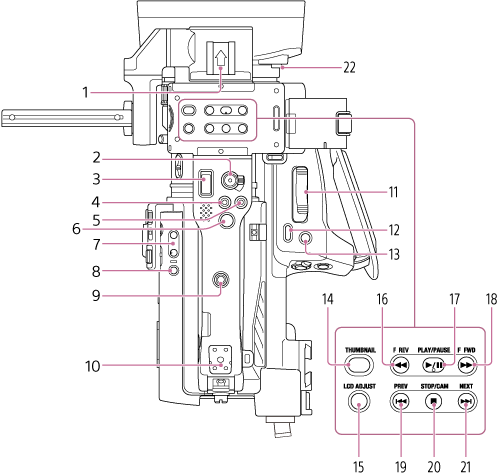
-
Accessory shoe
-
Record START/STOP button / HOLD switch (handle)
Press the record START/STOP button, turning the light on, to start recording. Press again, turning the light off, to stop recording.
When the HOLD switch is in the HOLD position, the record START/STOP button cannot be pressed.
-
Handle zoom lever
Adjusts the zoom between wide angle and telephoto. Move it slightly to zoom slowly, and move it further to zoom faster.
- ASSIGN (assignable) 9 button
- ASSIGN (assignable) 10 button
-
Multi selector
Used for auto focus operation and menu operation. Moves the cursor in 8 directions and selects values when pressed.
-
Volume button
Adjusts the volume of headphones/built-in speaker.
-
DISPLAY button
Shows/hides the status and settings of the unit.
Press for 10 seconds or longer to switch the HDMI output to 1920×1080 or 1280×720P, and enables the on-screen display overlay.
-
Accessory attachment screw hole
1/4 inch screw hole compatible with 1/4-20 UNC screws (length of 6 mm or shorter).
Note
- Use of screws longer than 6 mm may damage exterior parts.
-
Accessory shoe mount/Accessory attachment screw hole
1/4 inch screw hole compatible with 1/4-20 UNC screws (length of 6 mm or shorter).
Note
- Use of screws longer than 6 mm may damage exterior parts.
-
Zoom lever (grip)
Adjusts the zoom between wide angle and telephoto. Move it slightly to zoom slowly, and move it further to zoom faster.
- DIRECT MENU / ASSIGN (assignable) 5 button
- FOCUS MAG / ASSIGN (assignable) 4 button
-
THUMBNAIL button
Press the button during shooting mode or playback mode to display the thumbnail screen. Press again to return to shooting mode.
-
LCD ADJUST button
Displays the level bar for LCD monitor brightness adjustment. Adjust using the multi selector or multi-function dial.
-
F REV button
Plays video in the reverse direction at high speed. Press the button again to increase the speed (3 steps).
-
PLAY/PAUSE button
Pauses playback. Press again to resume normal playback.
-
F FWD button
Plays video in the forward direction at high speed. Press the button again to increase the speed (3 steps).
-
PREV button
Jumps to the first image of the clip. If already positioned at the first image, it jumps to the start of the previous clip. When the F REV button is pressed while the PREV button is pressed, it jumps to the start of the first clip on the memory card.
-
STOP/CAM button
Press during playback to stop playback.
-
NEXT button
Jumps to start of next clip.
If viewing the last clip, it jumps to the end of the clip. When the F FWD button is pressed while the NEXT button is pressed, it jumps to the end of the last clip on the memory card.
- Lens hood release button