


Changing the Settings of the [Speed 1] to [Speed 4] Buttons
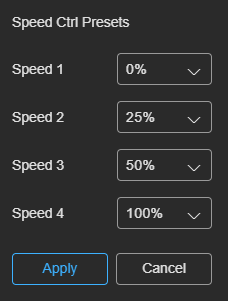
You can change the playback speed when you press the [Speed 1] to [Speed 4] buttons. To change a setting, select [Speed Presets] in  (Options) at the top right of the [Replay] tab to display the [Speed Ctrl Presets] dialog. Specify the playback speed (%) for each button and press the [Apply] button. You can specify a playback speed in the range 0 to 100 in 5% increments.
When the set value is changed, the display on the [Speed 1] to [Speed 4] buttons also changes.
Hint
- The settings of the [Speed 1] to [Speed 4] buttons are stored for each user. This does not affect other users using the same event.
TP1002508929
