


Configuring an External Audio Mixer (option license is required in AWS version)
Configuration method
Configure each item on the [Audio Mixer] tab of the [System Settings] screen. When finished configuring items, press the [Apply] button to apply the settings.
The audio tracks for output to an external audio mixer are configured on the [Switcher Input] tab.
[Audio Mixer] tab settings
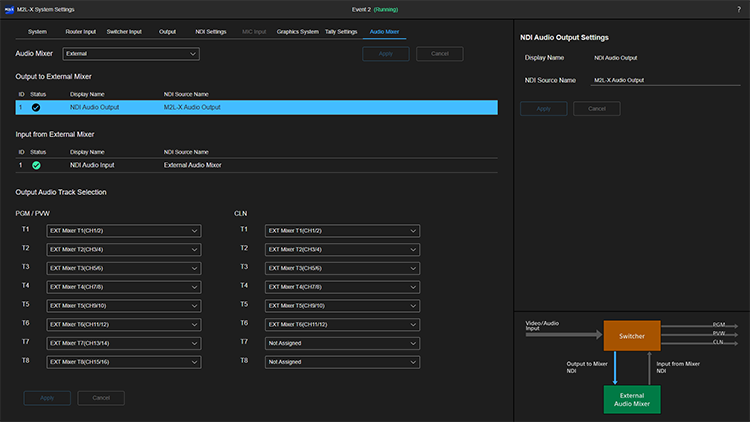
Setup items on the [Audio Mixer] tab are subdivided into the [Output Audio Track Selection] pane and [Settings] pane, each having an [Apply] button.
Note
- Depending on the event status, there may be restrictions on modifying the setting of each item.
- Modifying the following items when an event is running will display a confirmation message and cause the event to stop.
- [Audio Mixer] pane
- [Output to External Mixer] pane
- [Output Audio Track Selection] pane
- Modifying the following items when an event is running will display a confirmation message and cause the event to stop.
[Audio Mixer] pane
To use the external audio mixer, select [External].
Hint
- Other setup items on the [Audio Mixer] tab are displayed only when [External] is selected.
[Output Audio Track Selection] pane
You can assign up to 8 audio tracks (16 ch) to the PGM/PVW output and CLN output. The pull-down lists show the NDI input audio tracks from an external audio mixer. Select the audio tracks for the PGM/PVW output and CLN output, and press the [Apply] button.
Hint
- This setting does not affect the output audio from the [Live Operation] screen.
- Only the audio track selected for [T1] is output on the RTMP/RTMPS output and NDI CLN output.
[Settings] pane
You can change the NDI signal name selected in [Output to External Mixer] or [Input from External Mixer] on the left side.
[Switcher Input] tab settings
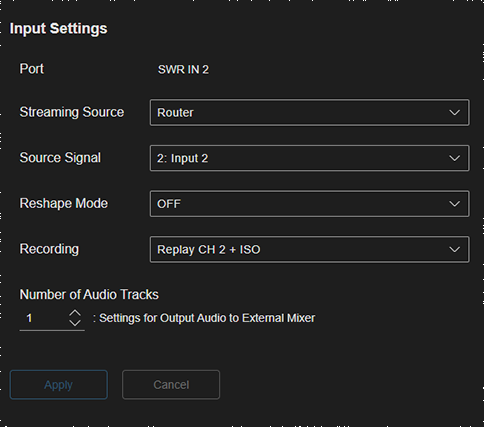
The audio tracks for output to an external audio mixer from this system are configured on the [Switcher Input] tab.
Select the switcher input for which you want to output audio to an external audio mixer in the list on the [Switcher Input] tab, then set the number of audio tracks to output from the selected switcher input using [Number of Audio Tracks] on the [Input Settings] pane.
Hint
- The number of audio tracks that can be output from a single switcher input varies depending on the input source assigned using [Source Signal].
- For switcher inputs with an SRT router input assigned as the input source, you can set the number of audio tracks to output to an external audio mixer in the range 0 to 8.
- For switcher inputs with other assigned input sources, you can set 0 or 1.
- A total of up to 32 audio tracks (64 ch) can be output to an external audio mixer from this system. [ID] values are assigned in order from the lowest to the highest switcher input, and tracks 33 and beyond are grayed out.
