


Structure of the [Account Manager] Screen
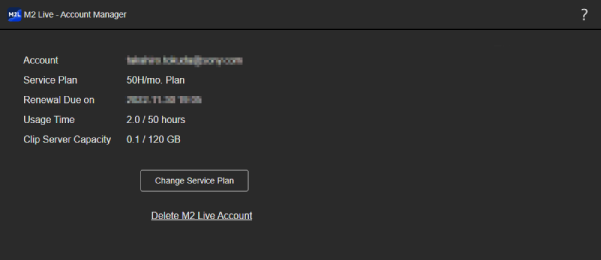
- [Account]: Displays the name of the signed in account.
- [Service Plan]: Displays the name of the current subscription plan.
- [Renewal Due On]: Displays the date on which your subscription plan will automatically be renewed.
-
[Usage Time]: Displays the current monthly usage time. When the remaining level falls below 20% or below 4 hours,
 (Caution) appears. When the usage level exceeds the upper limit,
  (Warning) appears.
 -
[Clip Server Capacity]: Displays the currently used storage capacity. When the remaining free space falls below 20%, (Caution) appears. When the usage capacity exceeds the upper limit, (Warning) appears.
- [Change Service Plan] button: Use when you want to subscribe to or change/cancel a subscription plan. The [Change Service Plan] screen appears.
-
[Delete M2 Live Account]: Use when you want to delete your account with this service. When you delete your account, all events and content in your group are deleted and cannot be restored.
Note
- The Sony account used to sign in to this service is not deleted.
