


Subscribing/Changing/Canceling a Plan
Press the [Change Service Plan] button on the [Account Manager] screen to display the [Change Service Plan] screen.
The available plans and their content are listed on the [Change Service Plan] screen. In addition to subscribing/changing/canceling a plan, you can change the credit card used for payment.
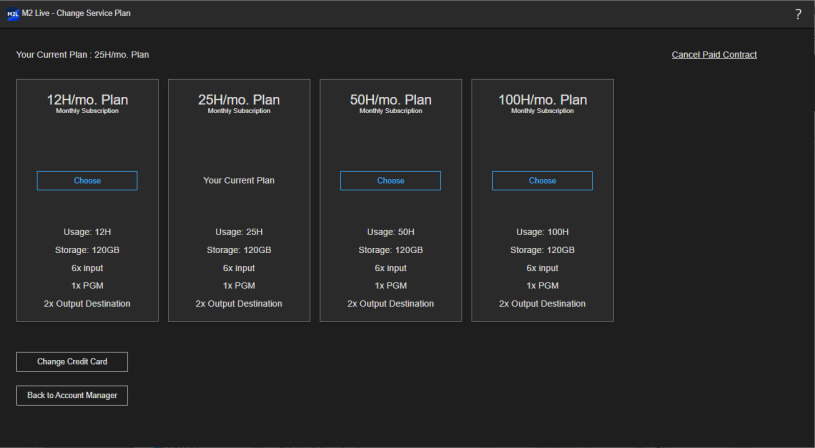
Subscribing to a plan
Press the [Choose] button for the plan to which you want to subscribe and follow the instructions in the dialog that appears. When you subscribe to a paid plan for the first time, you will be forwarded to an external site. Follow the on-screen instructions to enter the required information.
After subscribing to a plan, your subscription plan is displayed in the “Your Current Plan” field at the top left of the [Change Service Plan] screen (“No Contract” is displayed if you do not have a subscription). “Your Current Plan” is also displayed at the [Choose] button position of the subscribed plan.
Hint
- A 1-month free trial is also provided in addition to the paid plans for this service. The free trial can be used only once.
Changing a plan
Press the [Choose] button for the plan to which you want to subscribe in the same way as when you initially subscribed, and follow the instructions in the dialog that appears. When you subscribe to a paid plan for the first time, you will be forwarded to an external site. Follow the on-screen instructions to enter the required information.
When upgrading a plan, the plan is activated immediately and cannot be canceled.
When downgrading a plan, the plan will change after the valid period of the current plan expires. Until the plan changes, the date and time that the subscription will end (date and time the plan will change) and the name of the new plan are displayed in the display area of the current subscription plan.
Canceling a plan
If you want to cancel a subscription plan, press [Cancel Paid Contract] displayed at the top right of the screen and follow the instructions in the dialog that appears.
After canceling, you can continue to use the plan until the subscription expiry date. Until the subscription expires, the date and time that the subscription will end (date and time the plan will change) and “No Contract” are displayed in the display area of the current subscription plan.
Hint
- During the free trial, [Cancel Free Trial] is displayed. When a free trial is canceled, it is canceled immediately without waiting for the valid period to end.
Undoing a plan downgrade/cancellation
After downgrading/canceling a plan, you can continue to use the current subscription plan until the expiry date of the plan. During that period, a [Resubscribe] button is displayed in the display area of the current subscription plan.
To undo the downgrade/cancellation and continue using the current plan, press the [Resubscribe] button and follow the instructions in the dialog that appears.
Changing the credit card used for payment
Press the [Change Credit Card] button at the bottom left of the screen and follow the instructions in the dialog that appears. You will be forwarded to an external site. Follow the on-screen instructions to enter the required information.
Hint
- The [Change Credit Card] button is enabled only while you are subscribed to a paid plan.
Switching to the [Account Manager] screen
Press the [Back to Account Manager] button at the bottom left of the screen to return to the [Account Manager] screen.
