


Adjusting the Flange Focal Distance
This function automatically adjusts the flange focal distance (flange back (FB)) from the lens attachment surface and the plane of the imaging device.
This adjustment will be required if the focus is not correct at the wide-angle and telephoto ends of the optical zoom. When adjusted correctly, the focus will be maintained if you change the zoom position after adjusting the focus.
Adjustment preparations
Be sure to do the following before adjustment.
-
Download the flange focal distance adjustment chart from the dedicated URL and print out at A3 paper size.
-
Place the camera on a horizontal surface.
Remove any conversion lens or other devices, if attached.
-
Place the flange focal distance adjustment chart (A3 paper size recommended) about 2 m (6 ft) away, move the zoom to the telephoto end, and shoot the chart so that the center of the flange focal distance adjustment chart is in the center of the screen.
Make sure that no other object at a different distance than the chart will appear near the center of the screen (within the dotted line area in the diagram below) when the zoom is set to the wide-angle end.
A: Dotted area displays only the dedicated chart.
-
Set the zoom to the wide-angle end and configure the following settings.
Switch settings
B: IRIS dial: F2.8 (open)
C: ISO/GAIN switch: 0 dB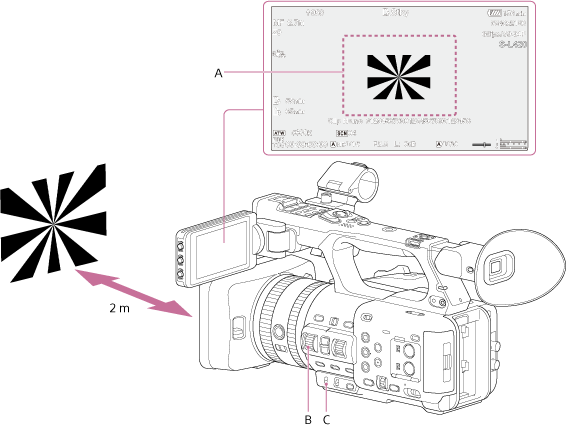
Full menu settings
[Project] – [Rec Format] – [Frequency]: 59.94 or 50
[Project] – [Rec Format] – [Video Format]: 3840×2160P
[Shooting] – [S&Q Motion] – [Setting]: [Off]
[Shooting] – [SteadyShot] – [Setting]: [Off] - Adjust the brightness using the lighting and ND filters so that the image is at an appropriate brightness across the whole zoom range.
Running auto adjustment
- Select [Technical] – [Lens] – [Auto FB Adjust] – [Execute] in the full menu.
- Check the description and select [Execute] on the confirmation screen.
To cancel the flange focal distance auto adjustment
Select [Cancel] displayed during the adjustment process.
To reset adjustment values to the factory default state
- Select [Technical] – [Lens] – [Auto FB Adjust] – [Reset] in the full menu.
- Check the description and select [Execute] on the confirmation screen.
Note
- Do not touch the camera during the adjustment process.
- A message is displayed if the adjustment fails. Check the following if the adjustment fails.
- Is the brightness of the flange focal distance adjustment chart appropriate?
If the brightness is not appropriate, a message is displayed and the adjustment is aborted. - Is the flange focal distance adjustment chart too close or too far away?
- Was the “Adjustment preparation” procedure performed correctly?
- Are there any high-brightness objects, such as lights, appearing on the camera screen?
- Is the brightness of the flange focal distance adjustment chart appropriate?