


IRIS Dial
You can assign the gain, auto exposure level, or audio recording level adjustment function to the IRIS dial.
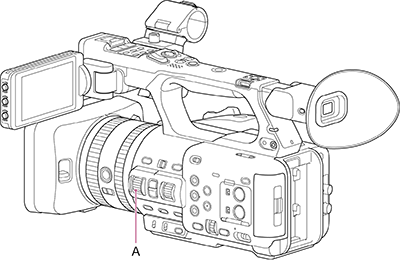
A: IRIS dial
Assign a function to the IRIS dial using [Project] – [IRIS Dial] in the full menu.
| Setting | Description |
|---|---|
| [Off] | Disables IRIS dial operation. |
| [ISO/Gain] | Adjusts the gain. |
| [IRIS] (default value) | Adjusts the iris. |
| [Auto Exposure Level] | Adjusts the auto exposure level. |
| [Audio Input Level] | Adjusts the audio recording level. |
Hint
- Even when [Focus, IRIS] or [Zoom, IRIS] is assigned to the lens rings using [Project] – [Lens Ring] in the full menu, you can also assign [IRIS] to the IRIS dial.
- The [Assignable Button] status screen is useful for checking the functions assigned to the IRIS dial.
Note
- The setting cannot be changed during playback, during thumbnail display, or while using mass storage mode. The setting also cannot be changed while the camera is executing a function, such as auto white balance.
TP1002005853