


Status Screen
You can check the settings and status of the unit on the status screen. The settings of items marked with an asterisk (*) can be changed.
To display the status screen
- Press the MENU button.
Hint
- You can show/hide each status screen using [Technical] – [Menu Settings] – [Menu Page On/Off] in the full menu.
To switch the status screen
- Turn the multi-function dial.
- Push the multi selector up/down.
- Swipe the status screen up/down.
- Swipe the status screen to the right to display the [Index] screen and select the page you want to see.
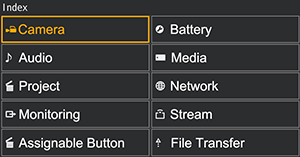
To hide the status screen
- Press the MENU button.
To change a setting
With the status screen displayed, press the multi-function dial or multi selector to enable selection of a setup item within a page. Select a page number and then press to switch pages.
You can also select items directly using touch operation.
Note
- You can disable changes from the status screen by setting [Technical] – [Menu Settings] – [User Menu Only] to [On] in the full menu.
[Camera] status screen
Displays the status of various presets.
| Display item | Description |
|---|---|
| [White Switch<B>] | White balance memory B setting |
| [White Switch<A>] | White balance memory A setting |
| [White Switch<P>] | [Preset White] setting |
| [ND]<preset>* | ND filter [Preset] setting |
| [ISO/Gain<L>]* | [ISO/Gain<L>] setting |
| [ISO/Gain<M>]* | [ISO/Gain<M>] setting |
| [ISO/Gain<H>]* | [ISO/Gain<H>] setting |
| [Zebra1]* | Zebra 1 on/off setting and level |
| [Zebra2]* | Zebra 2 on/off setting and level |
| [VF Gamma] / [Gamma] | Gamma category and curve |
| [Scene File]* | Scene file in use and its file ID |
[Audio] status screen
Displays the input setting, audio level meter, and volume monitor setting for each channel.
| Display item | Description | |
|---|---|---|
| [CH1] | [Level] | Auto adjustment on/off status Audio level meter |
| [Source]* | Input source | |
| [Reference]* | Input reference level | |
| [Wind Filter]* | Microphone wind noise reduction filter setting | |
| [CH2] | [Level] | Auto adjustment on/off status Audio level meter |
| [Source]* | Input source | |
| [Reference]* | Input reference level | |
| [Wind Filter]* | Microphone wind noise reduction filter setting | |
| [CH3] | [Level]* | Auto adjustment on/off status Audio level meter |
| [Source]* | Input source | |
| [Reference]* | Input reference level | |
| [Wind Filter]* | Microphone wind noise reduction filter setting | |
| [CH4] | [Level]* | Auto adjustment on/off status Audio level meter |
| [Source]* | Input source | |
| [Reference]* | Input reference level | |
| [Wind Filter]* | Microphone wind noise reduction filter setting | |
| [Audio Input Level]* | Audio input level (master volume) setting | |
| [HDMI Output CH]* | HDMI and headphone output audio channel setting | |
| [Headphone Out]* | Headphone output type setting | |
| [Monitor CH]* | Monitor channel setting | |
[Project] status screen
Displays the basic settings related to the shooting project.
| Display item | Description |
|---|---|
| [Frequency/Scan]* | System frequency and scanning method settings |
| [Codec]* | Codec setting for recording |
| [Rec Function]* | Special recording function on/off setting and main settings |
| [Simul Rec]* | 2-slot simultaneous recording function on/off status and setting |
| [Title Name]* | Title portion of the clip name |
| [Video Format]* | Picture size for recording to memory cards |
| [Picture Cache Rec]*1) | Picture cache recording function on/off and cache size settings |
| [Number] | Numeric suffix of the clip name |
| [Shooting Mode]* | Shooting mode setting |
| [Auto Framing]* | Auto framing function setting |
| [Proxy Rec]* | Proxy recording on/off setting |
1)PXW-Z200 only
[Monitoring] status screen
Displays the SDI/HDMI output settings.
| Display item | Description | |
|---|---|---|
| [SDI]1) | [Signal]* | Output picture size |
| [Info. Disp.]* | Screen display output on/off setting | |
| [Color Gamut]* | Color gamut setting/Monitor LUT status | |
| [HDMI] | [Signal]* | Output picture size |
| [Info. Disp.]* | Screen display output on/off setting | |
| [Color Gamut]* | Color gamut setting/Monitor LUT status | |
| [IP/USB] | [Signal]* | Output picture size/Switch to [Stream] status screen/[USB Stream] on/off setting |
| [Info. Disp.] | Screen display output ([Off] (fixed)) | |
| [Color Gamut]* | Color gamut setting/Monitor LUT status | |
| [LCD/VF] | [Color Gamut]* | Gamma display assist setting/Color gamut setting/Monitor LUT status |
| [Base Look/LUT]* | [Base Look/LUT] setting | |
| [Gamma Display Assist]* | [Gamma Display Assist] on/off status | |
1)PXW-Z200 only
[Assignable Button] status screen
Displays the functions assigned to each of the assignable buttons.
| Display item | Description |
|---|---|
| 1 | Function assigned to the assignable 1 button |
| 2 | Function assigned to the assignable 2 button |
| 3 | Function assigned to the assignable 3 button |
| 4 | Function assigned to the assignable 4 button |
| 5 | Function assigned to the assignable 5 button |
| 6 | Function assigned to the assignable 6 button |
| 7 | Function assigned to the assignable 7 button |
| 8 | Function assigned to the assignable 8 button |
| 9 | Function assigned to the assignable 9 button |
| 10 | Function assigned to the assignable 10 button |
| 11 | Function assigned to the assignable 11 button |
| [<PUSH AUTO>] | Function assigned to the FOCUS PUSH AUTO button |
| [Multi Function Dial] | Function assigned to the multi-function dial |
| [Lens Ring] | Functions assigned to the lens rings |
| [IRIS Dial] | Function assigned to the IRIS dial |
[Battery] status screen
Displays information about the battery and DC IN source.
| Display item | Description |
|---|---|
| [Detected Battery] | Type of battery |
| [Remaining] | Remaining capacity (%) |
| [Charge Count] | Number of recharges |
| [Capacity] | Remaining capacity (Ah) |
| [Voltage] | Battery voltage (V) |
| [Manufacture Date] | Date of battery manufacture |
| [Video Light Remaining] | Remaining capacity of the video light battery |
| [Power Source] | Power supply source |
| [Supplied Voltage] | Supplied power source voltage |
[Media] status screen
Displays the remaining capacity and remaining recording time of the memory cards.
| Display item | Description |
|---|---|
| Memory card A information | Displays an icon when a memory card is inserted in slot A. |
| Memory card A remaining capacity meter | Displays the remaining capacity of the memory card inserted in slot A expressed as a percentage on a bar graph. |
| Memory card A remaining time | Displays an estimate of the remaining recording time of the memory card inserted in slot A in units of minutes under the current recording conditions. |
| Memory card A initialization button | Press to display the menu for initializing memory card A. |
| Memory card B information | Displays an icon when a memory card is inserted in slot B. |
| Memory card B remaining capacity meter | Displays the remaining capacity of the memory card inserted in slot B expressed as a percentage on a bar graph. |
| Memory card B remaining time | Displays an estimate of the remaining recording time of the memory card inserted in slot B in units of minutes under the current recording conditions. |
| Memory card B initialization button | Press to display the menu for initializing memory card B. |
[Network] status screen
Displays the network connection status.
| Display item | Description |
|---|---|
| [Wireless LAN]* | Wireless LAN settings and connection status |
| [Wired LAN]* | Wired LAN settings and connection status |
| [USB] / [USB Stream] / [USB Tethering]* | USB function settings and connection status |
| [Bluetooth] | Bluetooth setting and connection status |
| [Show Authentication] | Press to display the user name and password for connecting to the unit |
Hint
- If the [Status] column is flashing, tapping a flashing item may display hints on what to do. For details, see “Connecting with “Monitor & Control”,” “Connecting to the Internet via Wireless LAN,” “Connecting to the Internet via USB Tethering,” and “Connecting to the Internet via Wired LAN.”
[Stream] status screen
Displays the streaming status.
| Display item | Description |
|---|---|
| [RTMP/RTMPS Status]* / [SRT-Caller Status]* | Streaming function on/off setting. When set to [On], it also displays the streaming function status. |
| [ARC] | [SRT-Caller 1] to [SRT-Caller 3] auto rate control function on/off status. When set to [On], it also displays the auto rate control status. |
| [Destination]* | Streaming destination setting |
| [Latency] / [TTL] | [SRT-Caller 1] to [SRT-Caller 3] streaming latency and time-to-live (TTL) |
| [Destination URL] | Streaming destination URL |
| [Codec] | Codec |
| [Audio Channel] | Audio channel |
| [Resolution] / [Bit Rate] | Streaming resolution and bit rate |
[File Transfer] status screen
Displays file transfer information.
| Display item | Description |
|---|---|
| [Auto Upload]* | [Auto Upload] on/off status |
| [Auto Upload (Proxy)]* | [Auto Upload (Proxy)] on/off/chunk status |
| [Total Transfer Progress] | Transfer progress of all jobs |
| [Default Upload Server]* | [Auto Upload (Proxy)] transfer destination server selection |
| [Job Status(Remain/Total)] | Remaining number of jobs and total number of jobs |
| [Current File Transfer Progress] | Transfer progress of current file transfer |
| [Current Transferring File Name] | Name of file currently being transferred |
| [Server Address] | Address of file transfer destination server |
| [Destination Directory] | Destination directory of file transfer destination server |