


Lens Rings
You can change the function of the lens rings (focus ring, zoom ring).
The iris is adjusted using the IRIS dial, but you can adjust the iris using the zoom ring by assigning the iris adjustment function to the lens ring.
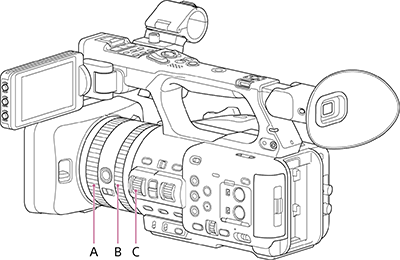
A: Focus ring
B: Zoom ring
C: IRIS dial
Assign functions to the lens rings using [Project] – [Lens Ring] in the full menu.
| Setting | Description |
|---|---|
| [Focus, Zoom] (default value) | Adjusts the focus manually using the focus ring (A). Adjusts the zoom using the zoom ring (B). |
| [Focus, IRIS] | Adjusts the focus manually using the focus ring (A). Adjusts the iris using the zoom ring (B). |
| [Zoom, IRIS] | Adjusts the zoom using the focus ring (A). Adjusts the iris using the zoom ring (B). |
Hint
- Even when [IRIS] is assigned to the IRIS dial using [Project] – [IRIS Dial] in the full menu, you can also assign [Focus, IRIS] or [Zoom, IRIS] to the lens rings.
- The [Assignable Button] status screen is useful for checking the functions assigned to the lens rings.
Note
- The setting cannot be changed during playback, during thumbnail display, or while using mass storage mode. The setting also cannot be changed while the camera is executing a function, such as auto white balance.
TP1002005852