


Clip Flags
During shooting or shooting standby, you can attach an [OK]/[NG]/[KEEP] flag to the clip being recorded or most recent clip.
This is configurable only if the connected camera is an ILME-FX3 / ILME-FX3A / ILME-FX30.
-
Tap
 (Menu) – [Monitoring].
The [Monitoring] screen appears.
-
Tap [CLIP FLAG].
An attach/delete [OK]/[NG]/[KEEP] flag screen appears.
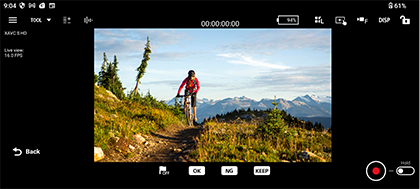
-
Tap the desired icon.
-
 (Off) icon: Deletes the flag attached to the clip currently being recorded or the most recent clip.
 -
 (OK) flag: Attaches an [OK] flag to the clip currently being recorded or the most recent clip.
 -
 (NG) flag: Attaches an [NG] flag to the clip currently being recorded or the most recent clip.
 -
 (Keep) flag: Attaches a [KEEP] flag to the clip currently being recorded or the most recent clip.
-
TP1002078353
