


DISP (Screen Disp) Set (Monitor/Finder)

Allows you to set the screen display modes that can be selected using DISP (Display Setting) in shooting mode.
- MENU →
 (Setup) → [Operation Customize] → [DISP (Screen Disp) Set] → [Monitor] or [Finder] → desired setting → [Enter].
The items marked with
(Setup) → [Operation Customize] → [DISP (Screen Disp) Set] → [Monitor] or [Finder] → desired setting → [Enter].
The items marked with (check) are available.
Menu item details
- Display All Info. :
- Shows recording information.
- No Disp. Info. :
- Does not show recording information.
You can set whether to always display the exposure values and other information or to hide them after a certain period of time has elapsed from operation of the shutter button, etc. ([Exposure: On]/[Exposure: TimeOut])- The [Exposure: TimeOut] setting is available when exposure values and other information are superimposed on the image displayed on the monitor or viewfinder (for example, when shooting movies during vertical display).
- Histogram :
- Displays the luminance distribution graphically.
In the [Finder] settings, you can set whether to always display exposure values and other information during vertical display or to hide them after a certain period of time has elapsed from the last operation of the shutter button, etc. (when the camera’s system software (firmware) is Ver.4.00 or later). ([Exposure: On] / [Exposure: TimeOut])
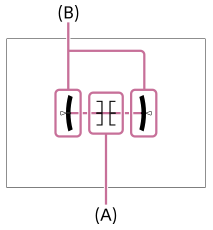
- Level :
- Indicates whether the product is level in both the front-back (A) and horizontal (B) directions. When the product is level in either direction, the indicator turns to green.
-
In the [Finder] settings, you can set whether to always display exposure values and other information during vertical display or to hide them after a certain period of time has elapsed from the last operation of the shutter button, etc. (when the camera’s system software (firmware) is Ver.4.00 or later). ([Exposure: On] / [Exposure: TimeOut])
-
 For viewfinder*:
 -
Displays only shooting information on the monitor, not the subject. This setting is a display setting for shooting with the viewfinder.
- Monitor Off*:
-
Always turns the monitor off when shooting images. You can use the monitor when playing back images or operating MENU. This setting is a display setting for shooting with the viewfinder.
*These screen modes are available only in the setting for [Monitor].
Note
- If you tilt the product forward or backward by a large degree, the level error will be great.
- The product may have a margin of error of almost ±1° even when the inclination is corrected by the level.