


PTZ Auto Framing Using the Supplied Infrared Remote Control
You can turn PTZ auto framing on/off using the supplied infrared remote control.
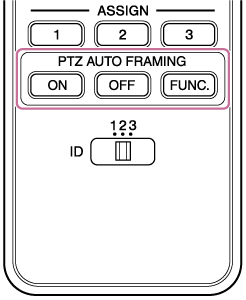
Press the ON button to turn on PTZ auto framing. Press the ON button while PTZ auto framing is paused to resume PTZ auto framing.
Press the OFF button to turn off PTZ auto framing.
Each time you press the FUNC. button, the tracking target switches between one person and multiple people.
You can set the number of people to track when tracking multiple people using  (PTZ AFR1) tab – [Number of Targets] on the live operation screen of the Web App or the [Number of Targets] screen on the PTZ AFR settings screen.
TP1001868326
