


Web App Screen Display During PTZ Auto Framing
During PTZ auto framing, the Web App screen displays the operating status and operating range of PTZ auto framing on the live operation screen.
Operating status display
The following states exist for PTZ auto framing.
| Live operation screen display | Status |
|---|---|
| (No display) | PTZ auto framing is off. |
| [Preparing] | Preparing for PTZ auto framing execution. |
| [Return to Start Position] | Moving to the configured start position. (Auto tracking start mode only) |
| [Detecting (a/b)] | Detecing the tracking target. When tracking multiple people, the number of people detected at that time (a) and the number of people being tracked (b) are displayed. (Auto tracking start mode only) |
| [Select Target] | Waiting for tracking target selection. Tap a person to track in the camera image panel. |
| [Tracking (a/b)] | Target is being tracked. When tracking multiple people, the number of people detected at that time (a) and the number of people being tracked (b) are displayed. |
| [Tracking Paused (a/b)] | Tracking is paused. Press the [Resume] button or tap a person within the camera image panel to resume tracking. When tracking multiple people, the number of people detected at that time (a) and the number of people being tracked (b) are displayed. |
| [Target Lost] | Tracking of the selected target has been lost. |
You can select a tracking target by tapping a person within the camera image panel in the [Detecting], [Tracking], and [Target Lost] states when “Person” mode is selected.
You can monitor the PTZ auto framing execution status using the tally lamp of the unit. For details, see “Checking the PTZ Auto Framing Status Remotely.”
When not in the [Tracking] state, the background of the text indicating the PTZ auto framing state is highlighted in yellow on the live operation screen of the Web App.
Operating range display
Th following frame is displayed on the camera image of the Web App according to the PTZ auto framing settings.
“Person” mode
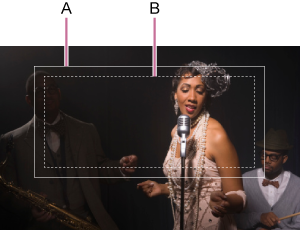
| A | Solid white line | Tracking range |
| B | Dashed white line | Range for human detection in auto tracking start mode |
Ball Sports (Basketball) mode
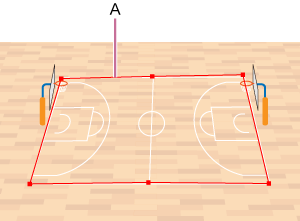
| A | Solid red line | Range of court. Displayed when PTZ auto framing is off. |
